
Amz Consultors logo Amz Consultors AutomationBook a free strategy call

Blog · Amazon Advertising · November 12, 2026

Amazon Marketing Cloud for Sellers: A Practical Starting Guide

Last checked against the Amazon Ads console on November 12, 2026

Every brand running sponsored ads now has Amazon Marketing Cloud (AMC) one click away in the Amazon Ads console. Most never open it, or open it once, see SQL and close it again. AMC answers questions the normal reports cannot: which campaigns work together, how long shoppers take to buy, which keywords start a purchase journey. This guide shows what AMC is, how to get in, and the six analyses worth running first, without writing a line of code.

Key takeaways

  • Since September 2025, AMC is open to every advertiser running Sponsored Products, Sponsored Brands, Sponsored Display or Sponsored TV, at no extra cost for the standard data.
  • You open it from Measurement & reporting › Amazon Marketing Cloud. Sponsored ads advertisers get an instance created automatically.
  • The home page and the use case library offer no-code templates; SQL is optional.
  • AMC is strongest for questions across campaigns and across time: overlap, path to conversion, time to conversion, new-to-brand gateway products and retargeting audiences.
  • Results are aggregated for privacy, so small accounts will see blank rows. Start with broad groupings and longer date ranges.

What AMC is, in plain terms

Your regular Amazon Ads reports are summaries. They tell you how many clicks and sales each campaign got, but each campaign is reported on its own and each sale goes to one ad. You cannot ask, "How many buyers saw both my Sponsored Brands video and my Sponsored Products ad, and did they convert better?"

AMC is a clean room: a secure place where Amazon keeps event-level ad and shopping data, pseudonymized, and lets you run questions against it. You never see an individual shopper. You get aggregated answers, such as the conversion rate of shoppers exposed to two campaign groups compared with one. Amazon describes it as a way to measure campaigns, uncover insights and build audiences from its shopping, browsing and streaming signals together with your own inputs.

For a seller, that translates into three practical uses:

  • Measurement across campaigns: how your ad types work together and in what order shoppers meet them.
  • Timing: how many hours or days pass between the last ad and the purchase.
  • Audiences: lists of shoppers, such as those who added to cart and did not buy, that you can use in Sponsored Display, Sponsored Products bid boosts or DSP.

How to open AMC

Amazon made AMC available to all sponsored ads advertisers on September 18, 2025. There is no application form for a single brand account.

Amazon Ads console › Measurement & reporting › Amazon Marketing Cloud

Amazon Ads console left menu with Measurement and reporting expanded and Amazon Marketing Cloud outlined
Figure 1. AMC sits under Measurement & reporting in the console's left menu, between Amazon Attribution and Reporting.
  1. Sign in to the Amazon Ads console with a user who can see the advertising account.
  2. Open the left menu, expand Measurement & reporting and click Amazon Marketing Cloud.
  3. If this is the first visit, AMC creates an instance linked to your sponsored ads account. Amazon calls this instant access; it takes minutes.
  4. Choose the marketplace at the top left. AMC opens in a single-country view; you can switch back to a multi-country view from the banner.
  5. Accept the terms shown on first use. Other users on your team need their own access to the advertising account before they can open the instance.

Agencies and multi-brand groups. If you want one AMC instance that combines several advertiser accounts, or includes Amazon DSP, Amazon asks you to apply through your Amazon Ads account executive or a partner. An AMC admin then creates instances and adds users. A single seller account does not need this.

A tour of the AMC home page
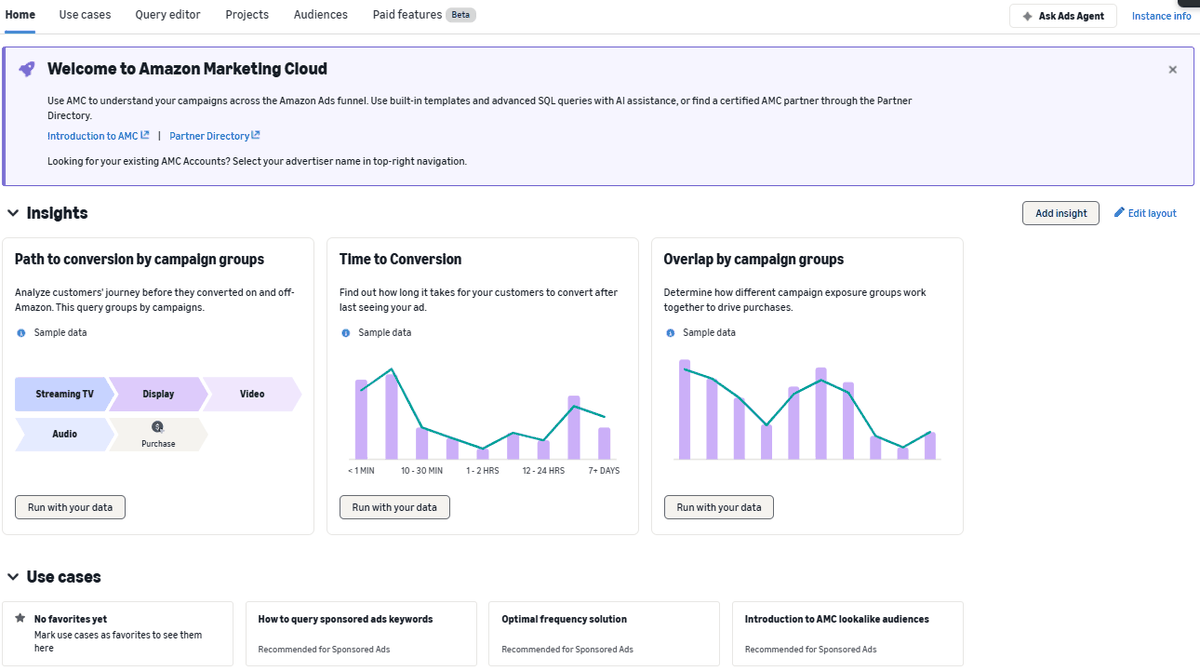
Amazon Marketing Cloud home page with tabs for Use cases, Query editor, Projects, Audiences and Paid features, and three insight cards showing sample data
Figure 2. The AMC home page. The three insight cards show sample data until you click Run with your data. The tabs along the top are where the real work happens.

The tabs along the top are worth knowing before you click anything:

TabWhat it doesWho it is for
HomeReady-made insight cards such as Path to conversion, Time to Conversion and Overlap by campaign groupsEveryone, start here
Use casesA library of Amazon-written templates, called instructional queries, filtered by Measurement, Audience, No code, Sponsored Ads and DSPEveryone
Query editorWrite or edit SQL directly, with AI helpAnalysts who know SQL
ProjectsSaved queries and their resultsAnyone running analyses repeatedly
AudiencesBuild and manage shopper lists from AMC resultsAdvertisers running retargeting
Paid featuresOptional datasets sold by subscriptionLarger brands with specific needs

The Ask Ads Agent button in the corner opens Amazon's AI assistant, which can explain a template or draft a query. We looked at the agent in detail in our Amazon Ads Agent guide. Treat its SQL as a draft and check the logic before you rely on the output.

Six analyses to run first

The use case library is long. Filter it to Sponsored Ads and No code and these six are the best starting points for a typical seller.

AMC use case library filtered to Sponsored Ads, showing no-code measurement templates such as path to conversion and overlap by campaign groups
Figure 3. The use case library with the Sponsored Ads quick filter applied. Each card shows whether it needs code and whether it measures or builds an audience.
Use case in the libraryQuestion it answersWhat you might change
Overlap by campaign groupsDo shoppers who see two ad types convert better than those who see one?Budget split between Sponsored Products, Sponsored Brands and display
Path to conversion by campaign groupsWhich sequence of ads comes before most purchases?Which campaigns to protect when cutting spend
Time to ConversionHow long after the last ad do shoppers buy?How long to wait before judging a test; retargeting windows
New-to-brand gateway ASINsWhich products bring in most first-time buyers?Which ASINs to feature in Sponsored Brands and video
Sponsored ads targeted keyword to purchase pathWhich keywords start journeys that end in a sale, even if another keyword gets the credit?Bids on early-journey keywords that look weak in normal reports
Audience that added to cart but did not purchaseWho showed strong intent and stopped?A retargeting audience for Sponsored Display or a bid boost

Two more worth bookmarking: Time of day performance, which supports dayparting decisions, and Audience of Brand Store visitors who did not purchase, if you have a Brand Store with meaningful traffic. If you run promotions, the newer Introduction to promotional purchases and Audience of customers by discount depth templates use promotional signals in the Amazon Retail Purchases dataset, which is a paid add-on.

A simple monthly AMC routine

AMC pays off when you use it every month. Figure 4 shows a routine that fits into one afternoon.

A monthly AMC routine for sellers Five steps: pick one question, run a no-code template, check the result against normal reports, make one change in the campaigns, and review it next month. NEXT MONTH STEP 1 Pick one question e.g. do SB and SP work better together? STEP 2 Run a template No-code use case, 60 to 90 days of data STEP 3 Sense-check Compare totals with your campaign reports STEP 4 Make one change Budget, bid, audience or featured ASIN STEP 5 Write it down Date, change and what you expect
Figure 4. A monthly AMC routine. The value comes from step 4: every analysis should end in one specific change you can measure the following month.

Keep a simple log of each question, the result and the change you made. After three or four months you will know which AMC insights actually move your numbers in your category.

Worked example: campaign overlap

The figures below are an example of what an Overlap by campaign groups result can look like for a mid-sized brand over 90 days. They are illustrative, not from a real account.

Exposure groupShoppers reachedPurchasersPurchase rate
Sponsored Products only120,0002,4002.0%
Sponsored Brands only40,0004801.2%
Both Sponsored Products and Sponsored Brands18,0009905.5%

Shoppers who saw both ad types bought at 5.5%, well above either ad type alone. The tempting conclusion is that Sponsored Brands "drives" the lift. Be careful: shoppers who see both are often already deep in their search, so some of the lift is selection, not cause. What the result does support is this: cutting Sponsored Brands to save money would probably cost more Sponsored Products sales than the normal reports suggest. A practical next step is to keep Sponsored Brands budget steady on your top category keywords and test a small increase on the ones that also have strong Sponsored Products coverage.

Always sense-check the totals. Add up purchasers across all groups and compare with ad-attributed orders in your normal campaign report for the same dates. AMC uses its own attribution and privacy rules, so the numbers will not match exactly, but if they differ by a factor of two, check your date range and campaign selection before acting.

Limits and paid add-ons

  • Privacy thresholds. AMC suppresses result rows that cover too few shoppers. Small brands will see blanks. Group campaigns more broadly, use longer date ranges, and avoid splitting by too many dimensions at once.
  • Paid features. Some templates are marked as needing a paid dataset: you will see notes such as "Amazon Retail Purchases required", "FSI required" or "ASI required" on the card. The standard sponsored ads data covers the six analyses above.
  • Different attribution. AMC results will not match console reports line for line. Use AMC for relationships and patterns, and the console for day-to-day bid management.
  • Time cost. Running a template takes minutes; interpreting it properly takes longer. Budget an afternoon, not ten minutes.

What this means for sellers

AMC used to be a tool for large brands with data teams. It is now in every sponsored ads account, with templates that need no code. For a brand spending a few thousand dollars a month across more than one ad type, it is the clearest way to see how campaigns support each other and where new customers come from. For a brand running only a handful of Sponsored Products campaigns, it is still worth one look at Time to Conversion and the keyword path template, then back to the fundamentals in our Amazon PPC Guide.

Pair AMC with the metrics Amazon has added to normal reporting. Our guides to Long-term sales and Full-Funnel Campaigns cover how Amazon now values new-to-brand shoppers, and AMC lets you check those claims with your own data.

FAQ

Does Amazon Marketing Cloud cost anything?

Access is included for advertisers running sponsored ads, and the standard sponsored ads data and no-code templates are free to use. Some optional datasets, shown under Paid features, are sold separately by subscription.

Do I need to know SQL to use AMC?

No. The home page insights and the No code templates in the use case library run with a few clicks. SQL becomes useful when you want to change a template or ask a question none of the templates cover, and Ads Agent can draft a starting query.

Why are some of my AMC results blank?

AMC hides rows that represent too few shoppers so that no individual can be identified. Combine campaigns into broader groups, extend the date range, or remove extra breakdowns, and run the template again.

Can I use AMC audiences in Sponsored Products?

AMC audiences can be used in Sponsored Display and Amazon DSP, and Amazon has added audience bid adjustments for Sponsored Products and Sponsored Brands that can use them. Check the Audiences tab in your instance for the options available in your marketplace.

Is AMC worth it for a small seller?

If you spend little and run one ad type, the insight is limited and privacy thresholds will blank many rows. Run Time to Conversion and the keyword-to-purchase path once, apply what you learn, and revisit when your spend or ad mix grows.

Want AMC insights without the learning curve?

We will run the key AMC analyses on your account and turn them into specific budget, bid and audience changes, free of charge for the first review.

Get a free audit Book a free strategy call →

Sources

  • Amazon Ads: "Amazon Marketing Cloud now available to all advertisers running sponsored ads campaigns" (September 18, 2025), advertising.amazon.com
  • Amazon Ads Support Center: "Accessing Amazon Marketing Cloud" (updated November 18, 2025), advertising.amazon.com
  • Amazon Ads: "Direct access to AMC for sponsored ads advertisers", advertising.amazon.com
  • Amazon Ads: Amazon Marketing Cloud product page, advertising.amazon.com
  • Amazon Ads console, Amazon Marketing Cloud home page and use case library, reviewed November 12, 2026

← All articles

Amz Consultors logo Amz Consultors AutomationBook a free strategy call
{{ t.label }}

Blog · Amazon Advertising · November 12, 2026

Amazon Marketing Cloud for Sellers: A Practical Starting Guide

Last checked against the Amazon Ads console on November 12, 2026

Every brand running sponsored ads now has Amazon Marketing Cloud (AMC) one click away in the Amazon Ads console. Most never open it, or open it once, see SQL and close it again. AMC answers questions the normal reports cannot: which campaigns work together, how long shoppers take to buy, which keywords start a purchase journey. This guide shows what AMC is, how to get in, and the six analyses worth running first, without writing a line of code.

Key takeaways

  • Since September 2025, AMC is open to every advertiser running Sponsored Products, Sponsored Brands, Sponsored Display or Sponsored TV, at no extra cost for the standard data.
  • You open it from Measurement & reporting › Amazon Marketing Cloud. Sponsored ads advertisers get an instance created automatically.
  • The home page and the use case library offer no-code templates; SQL is optional.
  • AMC is strongest for questions across campaigns and across time: overlap, path to conversion, time to conversion, new-to-brand gateway products and retargeting audiences.
  • Results are aggregated for privacy, so small accounts will see blank rows. Start with broad groupings and longer date ranges.

What AMC is, in plain terms

Your regular Amazon Ads reports are summaries. They tell you how many clicks and sales each campaign got, but each campaign is reported on its own and each sale goes to one ad. You cannot ask, "How many buyers saw both my Sponsored Brands video and my Sponsored Products ad, and did they convert better?"

AMC is a clean room: a secure place where Amazon keeps event-level ad and shopping data, pseudonymized, and lets you run questions against it. You never see an individual shopper. You get aggregated answers, such as the conversion rate of shoppers exposed to two campaign groups compared with one. Amazon describes it as a way to measure campaigns, uncover insights and build audiences from its shopping, browsing and streaming signals together with your own inputs.

For a seller, that translates into three practical uses:

  • Measurement across campaigns: how your ad types work together and in what order shoppers meet them.
  • Timing: how many hours or days pass between the last ad and the purchase.
  • Audiences: lists of shoppers, such as those who added to cart and did not buy, that you can use in Sponsored Display, Sponsored Products bid boosts or DSP.

How to open AMC

Amazon made AMC available to all sponsored ads advertisers on September 18, 2025. There is no application form for a single brand account.

Amazon Ads console › Measurement & reporting › Amazon Marketing Cloud

Amazon Ads console left menu with Measurement and reporting expanded and Amazon Marketing Cloud outlined
Figure 1. AMC sits under Measurement & reporting in the console's left menu, between Amazon Attribution and Reporting.
  1. Sign in to the Amazon Ads console with a user who can see the advertising account.
  2. Open the left menu, expand Measurement & reporting and click Amazon Marketing Cloud.
  3. If this is the first visit, AMC creates an instance linked to your sponsored ads account. Amazon calls this instant access; it takes minutes.
  4. Choose the marketplace at the top left. AMC opens in a single-country view; you can switch back to a multi-country view from the banner.
  5. Accept the terms shown on first use. Other users on your team need their own access to the advertising account before they can open the instance.

Agencies and multi-brand groups. If you want one AMC instance that combines several advertiser accounts, or includes Amazon DSP, Amazon asks you to apply through your Amazon Ads account executive or a partner. An AMC admin then creates instances and adds users. A single seller account does not need this.

A tour of the AMC home page

Amazon Marketing Cloud home page with tabs for Use cases, Query editor, Projects, Audiences and Paid features, and three insight cards showing sample data
Figure 2. The AMC home page. The three insight cards show sample data until you click Run with your data. The tabs along the top are where the real work happens.

The tabs along the top are worth knowing before you click anything:

TabWhat it doesWho it is for
HomeReady-made insight cards such as Path to conversion, Time to Conversion and Overlap by campaign groupsEveryone, start here
Use casesA library of Amazon-written templates, called instructional queries, filtered by Measurement, Audience, No code, Sponsored Ads and DSPEveryone
Query editorWrite or edit SQL directly, with AI helpAnalysts who know SQL
ProjectsSaved queries and their resultsAnyone running analyses repeatedly
AudiencesBuild and manage shopper lists from AMC resultsAdvertisers running retargeting
Paid featuresOptional datasets sold by subscriptionLarger brands with specific needs

The Ask Ads Agent button in the corner opens Amazon's AI assistant, which can explain a template or draft a query. We looked at the agent in detail in our Amazon Ads Agent guide. Treat its SQL as a draft and check the logic before you rely on the output.

Six analyses to run first

The use case library is long. Filter it to Sponsored Ads and No code and these six are the best starting points for a typical seller.

AMC use case library filtered to Sponsored Ads, showing no-code measurement templates such as path to conversion and overlap by campaign groups
Figure 3. The use case library with the Sponsored Ads quick filter applied. Each card shows whether it needs code and whether it measures or builds an audience.
Use case in the libraryQuestion it answersWhat you might change
Overlap by campaign groupsDo shoppers who see two ad types convert better than those who see one?Budget split between Sponsored Products, Sponsored Brands and display
Path to conversion by campaign groupsWhich sequence of ads comes before most purchases?Which campaigns to protect when cutting spend
Time to ConversionHow long after the last ad do shoppers buy?How long to wait before judging a test; retargeting windows
New-to-brand gateway ASINsWhich products bring in most first-time buyers?Which ASINs to feature in Sponsored Brands and video
Sponsored ads targeted keyword to purchase pathWhich keywords start journeys that end in a sale, even if another keyword gets the credit?Bids on early-journey keywords that look weak in normal reports
Audience that added to cart but did not purchaseWho showed strong intent and stopped?A retargeting audience for Sponsored Display or a bid boost

Two more worth bookmarking: Time of day performance, which supports dayparting decisions, and Audience of Brand Store visitors who did not purchase, if you have a Brand Store with meaningful traffic. If you run promotions, the newer Introduction to promotional purchases and Audience of customers by discount depth templates use promotional signals in the Amazon Retail Purchases dataset, which is a paid add-on.

A simple monthly AMC routine

AMC pays off when you use it every month. Figure 4 shows a routine that fits into one afternoon.

A monthly AMC routine for sellers Five steps: pick one question, run a no-code template, check the result against normal reports, make one change in the campaigns, and review it next month. NEXT MONTH STEP 1 Pick one question e.g. do SB and SP work better together? STEP 2 Run a template No-code use case, 60 to 90 days of data STEP 3 Sense-check Compare totals with your campaign reports STEP 4 Make one change Budget, bid, audience or featured ASIN STEP 5 Write it down Date, change and what you expect
Figure 4. A monthly AMC routine. The value comes from step 4: every analysis should end in one specific change you can measure the following month.

Keep a simple log of each question, the result and the change you made. After three or four months you will know which AMC insights actually move your numbers in your category.

Worked example: campaign overlap

The figures below are an example of what an Overlap by campaign groups result can look like for a mid-sized brand over 90 days. They are illustrative, not from a real account.

Exposure groupShoppers reachedPurchasersPurchase rate
Sponsored Products only120,0002,4002.0%
Sponsored Brands only40,0004801.2%
Both Sponsored Products and Sponsored Brands18,0009905.5%

Shoppers who saw both ad types bought at 5.5%, well above either ad type alone. The tempting conclusion is that Sponsored Brands "drives" the lift. Be careful: shoppers who see both are often already deep in their search, so some of the lift is selection, not cause. What the result does support is this: cutting Sponsored Brands to save money would probably cost more Sponsored Products sales than the normal reports suggest. A practical next step is to keep Sponsored Brands budget steady on your top category keywords and test a small increase on the ones that also have strong Sponsored Products coverage.

Always sense-check the totals. Add up purchasers across all groups and compare with ad-attributed orders in your normal campaign report for the same dates. AMC uses its own attribution and privacy rules, so the numbers will not match exactly, but if they differ by a factor of two, check your date range and campaign selection before acting.

Limits and paid add-ons

  • Privacy thresholds. AMC suppresses result rows that cover too few shoppers. Small brands will see blanks. Group campaigns more broadly, use longer date ranges, and avoid splitting by too many dimensions at once.
  • Paid features. Some templates are marked as needing a paid dataset: you will see notes such as "Amazon Retail Purchases required", "FSI required" or "ASI required" on the card. The standard sponsored ads data covers the six analyses above.
  • Different attribution. AMC results will not match console reports line for line. Use AMC for relationships and patterns, and the console for day-to-day bid management.
  • Time cost. Running a template takes minutes; interpreting it properly takes longer. Budget an afternoon, not ten minutes.

What this means for sellers

AMC used to be a tool for large brands with data teams. It is now in every sponsored ads account, with templates that need no code. For a brand spending a few thousand dollars a month across more than one ad type, it is the clearest way to see how campaigns support each other and where new customers come from. For a brand running only a handful of Sponsored Products campaigns, it is still worth one look at Time to Conversion and the keyword path template, then back to the fundamentals in our Amazon PPC Guide.

Pair AMC with the metrics Amazon has added to normal reporting. Our guides to Long-term sales and Full-Funnel Campaigns cover how Amazon now values new-to-brand shoppers, and AMC lets you check those claims with your own data.

FAQ

Does Amazon Marketing Cloud cost anything?

Access is included for advertisers running sponsored ads, and the standard sponsored ads data and no-code templates are free to use. Some optional datasets, shown under Paid features, are sold separately by subscription.

Do I need to know SQL to use AMC?

No. The home page insights and the No code templates in the use case library run with a few clicks. SQL becomes useful when you want to change a template or ask a question none of the templates cover, and Ads Agent can draft a starting query.

Why are some of my AMC results blank?

AMC hides rows that represent too few shoppers so that no individual can be identified. Combine campaigns into broader groups, extend the date range, or remove extra breakdowns, and run the template again.

Can I use AMC audiences in Sponsored Products?

AMC audiences can be used in Sponsored Display and Amazon DSP, and Amazon has added audience bid adjustments for Sponsored Products and Sponsored Brands that can use them. Check the Audiences tab in your instance for the options available in your marketplace.

Is AMC worth it for a small seller?

If you spend little and run one ad type, the insight is limited and privacy thresholds will blank many rows. Run Time to Conversion and the keyword-to-purchase path once, apply what you learn, and revisit when your spend or ad mix grows.

Want AMC insights without the learning curve?

We will run the key AMC analyses on your account and turn them into specific budget, bid and audience changes, free of charge for the first review.

Get a free audit Book a free strategy call →

Sources

  • Amazon Ads: "Amazon Marketing Cloud now available to all advertisers running sponsored ads campaigns" (September 18, 2025), advertising.amazon.com
  • Amazon Ads Support Center: "Accessing Amazon Marketing Cloud" (updated November 18, 2025), advertising.amazon.com
  • Amazon Ads: "Direct access to AMC for sponsored ads advertisers", advertising.amazon.com
  • Amazon Ads: Amazon Marketing Cloud product page, advertising.amazon.com
  • Amazon Ads console, Amazon Marketing Cloud home page and use case library, reviewed November 12, 2026

← All articles