
What it is and why it matters
The COGS system is where you keep everything needed to calculate the cost of goods sold (COGS) of your listings. It gives you the COGS for every product and makes sure the financial reports and numbers you look at every week and month are accurate.
COGS is the only number you add yourself to your finance reports; all the other metrics come straight from Amazon. Since every product decision should be based on your reports and data, getting this one number right is essential.
Main goals
- Better financial control.
- Reports you can trust when making decisions.
- Kept up to date for profitability reports, the pricing table, inventory valuation and the balance check.
- A key part of the setup for handing work to a VA and scaling the business.
What you'll use it for
- The inventory calculation check.
- SKU profitability reports.
- The pricing table.
- Tracking freight and purchase price trends.
The FIFO method
First In, First Out (FIFO) assumes the units that came into the warehouse first are the first to leave. The logic is simple: the oldest units have been held longest and are closest to expiring or becoming obsolete. FIFO is the most common method in this industry, so the COGS system uses it to work out the cost of goods sold each month.
Opening stock: 500 units at $3.00
August: 2,000 units received at $3.25 landed ($2.00 manufacturing + $1.25 freight)
Sold 900 net units + 20 disposals = 920 units out
FIFO: the 500 old units first (500 × $3.00 = $1,500), then 420 new ones (420 × $3.25 = $1,365)
August COGS: $2,865, or $3.11 per unit sold. Closing stock: 1,580 units worth $5,135
Opening stock, units received with manufacturing and freight cost, net units sold and disposals each month, COGS and closing inventory value.
Want these numbers for your own account? Get a free audit →One-time setup
- Make a copy of the COGS workbook
Download the COGS System workbook (Excel) ↓: one tab per SKU with FIFO built in. It also opens in Google Sheets.
- Add all your current SKUs
Duplicate the SKU tab for each SKU and name it exactly as the SKU is named in Seller Central.
- Choose your start date
You can start from an earlier month, but it takes longer because you'll add all the past data. The first day of that month is the date for your opening stock: starting in June means using June 1.
- Enter the opening stock
Units on the start date (see below) and the cost per unit you've used until now.
- Run the monthly process for each past month
Do this for as many months back as you want.
Getting the opening stock
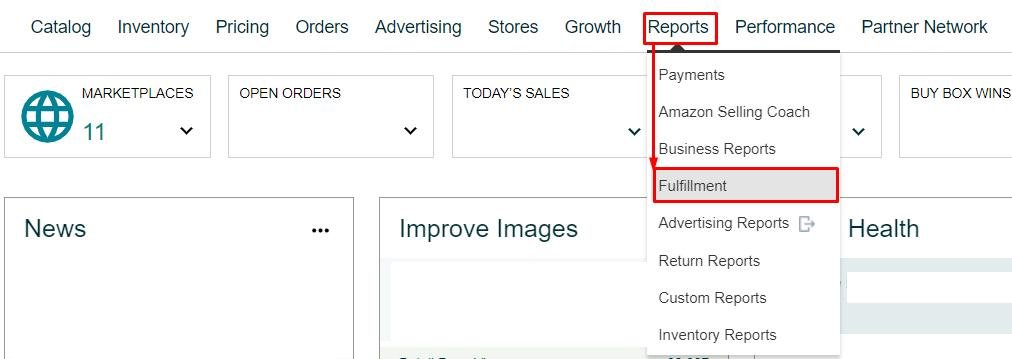
- Open Daily Inventory History
Seller Central›Reports›Fulfillment›Inventory›Daily Inventory History
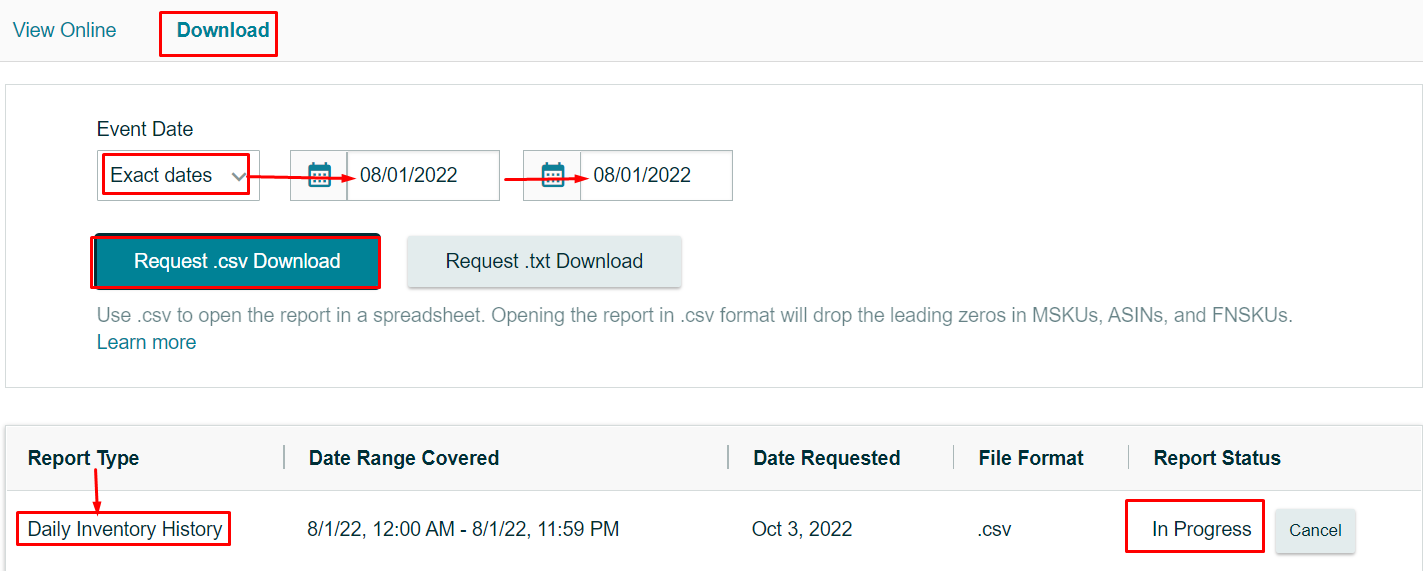
- Download the start date only
Download tab › Exact dates › the same date in From and To (for example 08/01 to 08/01) › Request .csv download.
- Add up the quantity per SKU
In the file, total the Quantity column for each SKU (a pivot table works well). Enter it as the opening stock units.

Monthly process
1. Units received
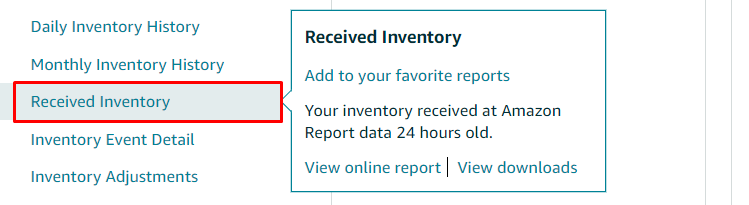
- Download Received Inventory for the month
Download tab › Exact dates › the first to the last day of the month › Request .csv download.
Seller Central›Reports›Fulfillment›Inventory›Received Inventory
- Add the units received per SKU
Total the quantity received for each SKU and enter it in that month's row. A SKU you don't have a tab for yet needs a new tab.

2. Manufacturing and freight costs
For each SKU that received units this month, enter the manufacturing cost and freight cost per unit from your purchase orders and freight invoices. Together they make the landed cost per unit, the base of the whole calculation, so make sure they're accurate.
SKU A received 2,000 units in September
Shipment 1: 1,000 units by air, $2 manufacturing + $2 freight = $4 a unit, $4,000 in total
Shipment 2: 1,000 units by sea, $2 manufacturing + $0.50 freight = $2.50 a unit, $2,500 in total
Average: ($4,000 + $2,500) ÷ 2,000 = $3.25 a unit
Manufacturing is the same, so enter $2.00 manufacturing and $1.25 average freight for the 2,000 units
3. Units sold
- Get the month's sales from Sellerboard or the Business Report
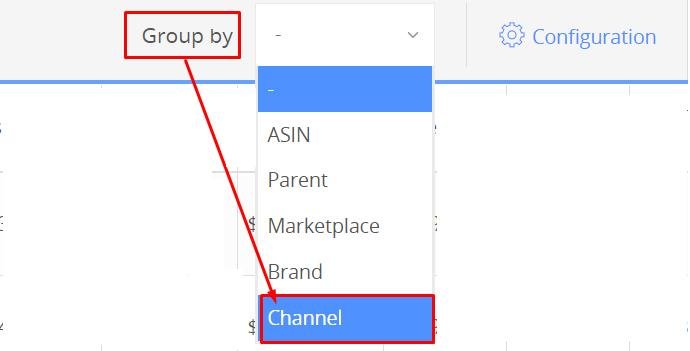
In Sellerboard: Dashboard › set the date range to the month › Group by "-" (no grouping). If you also sell FBM, group by Channel and keep only FBA.
- Download the table (.xls)
It lists each SKU with units sold and units refunded.
- Work out net units sold
Add a column after Refunds: Net sales = units sold − units refunded. Enter it as the month's net units sold.


4. Disposals
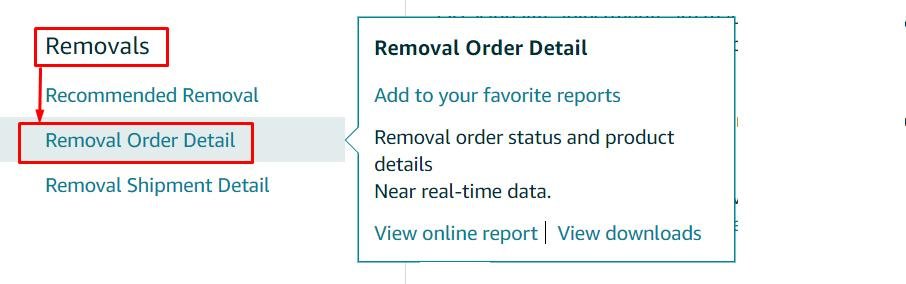
- Download Removal Order Detail for the month
These are the units Amazon disposed of or liquidated because they couldn't be sold.
Seller Central›Reports›Fulfillment›Removals›Removal Order Detail
- Work out the total
Add a column after canceled-quantity: Total = requested-quantity − canceled-quantity.
- Enter it as disposals for the month
These units are gone from your inventory, so their cost counts as an expense this month.

5. Check for errors
The workbook's Check column warns you if more units went out than you've recorded as received. That usually means a missing received-inventory month, a wrong opening stock, or a SKU name that doesn't match. Fix it before using the numbers.
6. Use the results
The COGS per unit sold for each SKU and month goes into your profitability reports and pricing table; the closing value is your inventory value for the month.
Owner SOP (recurring task)
Set it up as a recurring task, for example in Asana: Update COGS system, due on the 2nd to 5th of every month.
- Received units added from the Received Inventory report
- New SKUs added to the workbook
- Opening stock entered for new SKUs; manufacturing and freight costs for all units received
- Net units sold added from the monthly sales report, and disposals from Removal Order Detail
- Error and verification checks fixed
- COGS per unit updated in profitability reports and the pricing table
Related guides
- Negotiate with suppliers for lower COGSGet a better cost of goods from your existing supplier without changing quality: benchmark the market, open on a positive note, give…
- How to calculate your freight and duty when using AGLFind the Amazon Global Logistics freight and duty charges in your payments, and split them per unit and per ASIN, since Amazon doesn't do…
- Sellerboard for profit trackingSet up Sellerboard so real profit per product (after fees, ads, refunds and product cost) is visible daily, and use its restock and…