
Amz Consultors logo Amz Consultors AutomationBook a free strategy call

Blog · FBA & Inventory · November 12, 2026

AWD Capacity Limits: How Amazon's New Allocation Works

Last checked against Seller Central on November 12, 2026

Until now, Amazon Warehousing and Distribution (AWD) let US sellers send as much inventory as they liked. That ends on January 7, 2027, when Amazon starts blocking AWD shipments that go over a seller's allocated capacity. Your allocation is already visible in Capacity Manager, split between two kinds of facility. This guide explains how the allocation is calculated, how to read it, when a storage reservation is worth paying for, and how to plan shipments so your replenishment does not stall in the first quarter.

Key takeaways

  • Since November 9, 2026, AWD base capacity is allocated in cubic feet across two pools: palletizable facilities and standard facilities. Each pool is checked separately.
  • From January 7, 2027, you cannot create an AWD shipment that would take on-hand inventory plus open shipments above your total capacity.
  • Base capacity comes from your AWD history and is reviewed quarterly, shown six weeks ahead with up to 14 months of forward view.
  • Storage reservations add at least 1,000 cubic feet at one facility for 4 to 26 weeks, booked three weeks ahead. From February 1, 2027 they are billed on the reserved volume at the base rate plus 5%, used or not.
  • Requests to raise your base allocation are accepted by email only until December 4, 2026.

What changed and when

AWD is Amazon's bulk storage layer. You send cartons or pallets to an AWD facility, and Amazon replenishes your FBA inventory from there, automatically if you turn on auto-replenishment. Because AWD had no individual limits, many brands used it as an overflow warehouse for slow periods. Amazon now ties the space you get to the space you have used, and it steers growth toward pallet storage, which it says gives higher density and faster processing.

AWD capacity timeline, November 2026 to February 2027 November 9, 2026: base capacity shown in two pools. December 4, 2026: last day to email a base capacity increase request. January 7, 2027: capacity enforced at shipment creation and approved increases shown. February 1, 2027: storage reservations billed on committed volume. Nov 9, 2026 Dec 4, 2026 Jan 7, 2027 Feb 1, 2027 Base capacity shown in two pools Email window for base increase requests closes Limits enforced when you create a shipment Reservations billed on reserved volume (+5%)
Figure 1. The four dates that matter. Enforcement on January 7 is the one that can stop a shipment; the December 4 email window is the only way to ask for a higher base allocation before it.

How your AWD capacity is calculated

Total capacity has two parts, and Amazon counts usage the same way in both pools.

PartHow you get itHow long it lastsCost
Base capacity allocationCalculated from your historical AWD usage of on-hand inventory and open shipments. New or inactive sellers get a default based on their FBA and AWD profile, refreshed after 13 weeks of AWD historyReviewed quarterly, shown six weeks in advanceYou pay storage only on inventory actually on hand
Storage reservationRequested in Capacity Manager for one specific facility, minimum 1,000 cubic feet4 to 26 weeks, starting at least three weeks after the requestFrom February 1, 2027: base storage rate plus 5% on the full reserved volume

Amazon's own example: a base allocation of 1,500 cubic feet plus a 500 cubic foot reservation gives 2,000 cubic feet of total capacity. Usage is on-hand inventory plus every open AWD shipment, so a shipment you created but never sent still uses space until you cancel it.

The formula Capacity Manager uses. Capacity utilization (%) = (on-hand cubic feet + open shipment cubic feet) ÷ (base allocation + active reservation) × 100. Palletizable and standard pools each get their own percentage.

How to check your allocation in Capacity Manager

Inventory › Capacity Manager › AWD palletizable facilities (or AWD standard facilities)
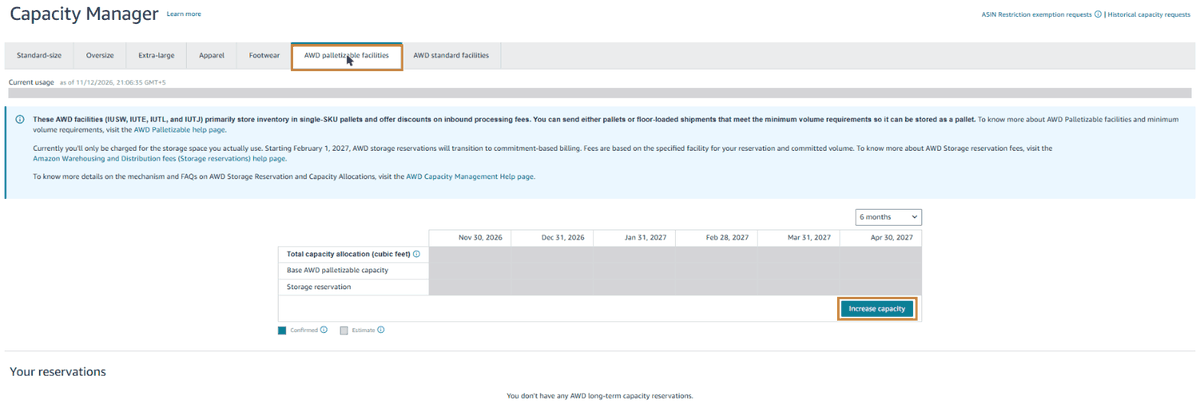
Seller Central Capacity Manager with the AWD palletizable facilities tab selected, an information banner about palletized storage and 2027 reservation billing, a six-month table of total capacity allocation, base capacity and storage reservation by month, and the Increase capacity button outlined; account figures are masked
Figure 2. Capacity Manager now has two AWD tabs next to the FBA storage types. The monthly table shows total allocation, base capacity and reservations; confirmed months are shaded differently from estimates. Account figures are hidden here.
  1. Open Capacity Manager from the Inventory menu, or search "Capacity Manager" in Seller Central.
  2. Click AWD palletizable facilities. Read the Current usage line under the tabs: cubic feet used against your total, and the percentage.
  3. Read the monthly table. Each column shows total capacity allocation, base capacity and any storage reservation. Use the drop-down at the top right to switch between 6 months and a longer view.
  4. Repeat on the AWD standard facilities tab. A shipment to a standard facility is checked only against the standard pool, even if your palletizable pool has plenty of room.
  5. For the split between on-hand stock and open shipments, open the Capacity Monitor widget on the AWD shipment creation page or the AWD Inventory page.

Palletizable facilities store single-SKU pallets and give discounts on inbound processing. You can send pallets or floor-loaded shipments, as long as each SKU meets the minimum volume to be stored as a pallet. Product eligibility tightened in 2026 as well: Amazon's eligibility page says that from July 31, 2026, AWD accepts only sortable items, smaller than 18 x 14 x 8 inches and under 20 lb, so check that page before you plan a shipment around an older SKU list.

Storage reservations: how to request one

A reservation is the only self-serve way to raise your ceiling after December 4, 2026. It secures space at one facility for a fixed window.

Capacity Manager › AWD palletizable facilities › Increase capacity
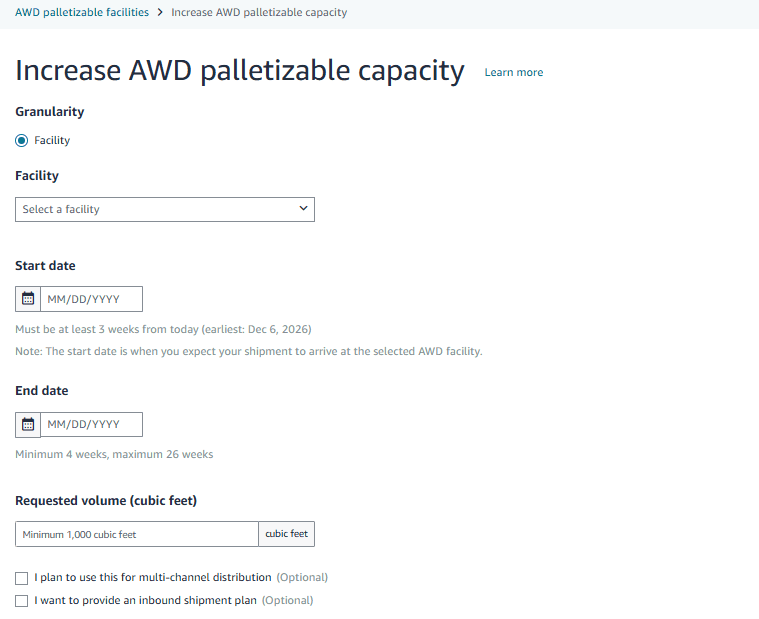
Increase AWD palletizable capacity form with Granularity set to Facility, a facility drop-down, start date field noting it must be at least three weeks from today, end date field noting minimum 4 and maximum 26 weeks, requested volume with a minimum of 1,000 cubic feet, and optional boxes for multi-channel distribution and an inbound shipment plan
Figure 3. The reservation form. The hints under each field state the rules: start at least three weeks out, run 4 to 26 weeks, reserve at least 1,000 cubic feet.
  1. Pick the tab for the pool you need, then click Increase capacity.
  2. Choose the facility. Your reserved space exists only there; shipments to other AWD facilities use whatever room is left in your base allocation.
  3. Set the start date for when your shipment should arrive, at least three weeks ahead, and an end date 4 to 26 weeks later.
  4. Enter the volume, at least 1,000 cubic feet.
  5. Tick I plan to use this for multi-channel distribution if the stock will also supply other channels, and I want to provide an inbound shipment plan if you want to upload the plan with the request.
  6. Check the Reservation summary panel on the right, then submit. Amazon reviews requests in the order received and tells you if the facility cannot take the volume.
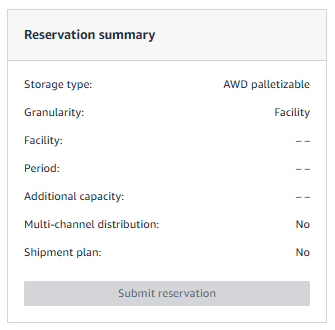
Reservation summary panel listing storage type AWD palletizable, granularity Facility, facility, period, additional capacity, multi-channel distribution No, shipment plan No, and a Submit reservation button
Figure 4. The summary panel fills in as you complete the form. Read it before submitting: from February 1, 2027 you pay for every cubic foot listed under additional capacity for the whole period.

You can hold two active reservations, one per pool. A new reservation for the same pool can only start after the current one ends. Cancelling has a three-week lock-in: cancel three or more weeks before the start week and the whole reservation goes; cancel later and the first three weeks stay billable.

Worked example: will your Q1 shipment fit?

The numbers below are an illustration, not real account data. Use the base storage rate for your region from the AWD fees page; we use $0.48 per cubic foot per month here only to show the arithmetic.

Item (palletizable pool)Cubic feet
Base allocation for January 20271,500
On-hand inventory1,100
Open shipments already created250
Used (on hand + open)1,350 (90%)
Room left150
Planned post-holiday shipment600
Shortfall at shipment creation450

From January 7, Seller Central will refuse to create the 600 cubic foot shipment. The seller has four options:

  1. Cancel any open shipment that will not actually be sent. If 100 of the 250 open cubic feet are a stale plan, the shortfall drops to 350.
  2. Split the shipment and send the second half after auto-replenishment has moved stock to FBA. Amazon says replenishment takes up to 14 days on average, longer at peak.
  3. Send part of it to a standard facility, if that pool has room and the SKUs qualify.
  4. Book a reservation. The minimum is 1,000 cubic feet, so covering a 450 cubic foot gap means paying for 550 unused cubic feet. At $0.48 plus 5% ($0.504), the reservation costs $504 a month, of which about $277 pays for empty space. Over an 8-week window that is roughly $1,000 for the reservation, against what a stockout or a 3PL would cost you.

For most small and mid-sized sellers, options 1 to 3 cost nothing and should come first. A reservation makes sense when the gap is close to 1,000 cubic feet, or when a launch or seasonal peak needs guaranteed space at a particular facility.

How to plan around the limits

Because base capacity follows usage, how you use AWD in the next few quarters shapes the allocation you get later.

  • Check both AWD tabs every month, and before every large purchase order rather than after the goods ship from the factory. Capacity shows six weeks ahead, which is shorter than most ocean lead times.
  • Cancel stale AWD shipment plans. They count as usage until cancelled.
  • Move pallet-friendly SKUs to palletizable facilities. That pool is where Amazon is adding space and where inbound discounts apply.
  • Keep auto-replenishment on and set FBA days of cover so AWD stock keeps flowing out. Stock that sits in AWD uses capacity, and low FBA levels can trigger the low-inventory-level fee.
  • Line up a fallback 3PL for overflow before January. If AWD refuses a shipment that is already on the water, you need somewhere to receive it.
  • If your sales are growing fast and your allocation reflects a smaller past, send the base increase request before December 4, 2026 with SKU-level monthly shipment plans for six months. Amazon ignores requests that miss required fields.

The email request goes to the address on Amazon's capacity management help page, with the subject line "AWD base capacity allocation increase request", your merchant token, current allocations per pool, the extra cubic feet you need per pool per month, the reason, and your expected monthly shipment plan. Approved changes appear in Capacity Manager by January 7, 2027; denials are emailed by the same date.

What this means for sellers

From January 2027, AWD space is rationed. Treat its capacity the way you already treat FBA capacity limits: check it before you buy, keep it clean of stale shipments, and plan the first quarter of 2027 with real numbers. Sellers who replenish steadily from AWD will likely see their allocation hold or grow. Sellers who park large volumes for months may find their January shipments refused, and from February a reservation that sits half empty becomes a monthly cost.

Capacity is one part of the 2027 FBA cost picture. Read our guides to the 2027 FBA and referral fee changes and the unified monthly storage fee, and our Capacity Manager walkthrough for FBA storage. If you also run ads on the products you are restocking, our Amazon PPC Guide shows how to pace spend while inventory is tight.

FAQ

What happens if I try to create an AWD shipment above my capacity?

From January 7, 2027, Seller Central will not let you create it. You can wait for inventory to move to FBA, cancel open shipments you do not plan to send, or request a storage reservation to raise your ceiling.

Do I pay for unused base capacity?

No. Base capacity is free headroom; you pay AWD storage only on inventory on hand. Storage reservations are different: from February 1, 2027 they are billed on the full reserved volume whether you use it or not.

Can I ship to any AWD facility, or only the one I reserved?

You can ship to any available AWD facility. Reserved space is held only at the facility you chose; shipments elsewhere draw on the room left in your base allocation.

I am new to AWD. What capacity will I get?

New sellers, and sellers inactive in AWD for six months, receive a default allocation based on their inventory profile and FBA history. Amazon refreshes it from actual usage once 13 weeks of AWD history exist.

Can I still ask Amazon for a higher base allocation?

Only until December 4, 2026, by email with the details listed on the capacity management help page. After that date, storage reservations in Capacity Manager are the way to add space.

Planning Q1 2027 inventory around the new limits?

We will review your AWD and FBA capacity, open shipments and replenishment settings, and give you a shipment plan that fits, free of charge for the first review.

Get a free audit Book a free strategy call →

Sources

  • Seller Central Help: "Amazon Warehousing and Distribution (AWD) capacity management", sellercentral.amazon.com
  • Seller Central Help: "Amazon Warehousing and Distribution storage reservation fees", sellercentral.amazon.com
  • Seller Central Help: "Amazon Warehousing and Distribution fees", sellercentral.amazon.com
  • Seller Central Help: "Amazon Warehousing and Distribution (AWD) product eligibility", sellercentral.amazon.com
  • Seller Central Help: "Replenishment from AWD to the FBA network", sellercentral.amazon.com
  • Seller Central, Capacity Manager AWD tabs and storage reservation form, reviewed November 12, 2026

← All articles

Amz Consultors logo Amz Consultors AutomationBook a free strategy call
{{ t.label }}

Blog · FBA & Inventory · November 12, 2026

AWD Capacity Limits: How Amazon's New Allocation Works

Last checked against Seller Central on November 12, 2026

Until now, Amazon Warehousing and Distribution (AWD) let US sellers send as much inventory as they liked. That ends on January 7, 2027, when Amazon starts blocking AWD shipments that go over a seller's allocated capacity. Your allocation is already visible in Capacity Manager, split between two kinds of facility. This guide explains how the allocation is calculated, how to read it, when a storage reservation is worth paying for, and how to plan shipments so your replenishment does not stall in the first quarter.

Key takeaways

  • Since November 9, 2026, AWD base capacity is allocated in cubic feet across two pools: palletizable facilities and standard facilities. Each pool is checked separately.
  • From January 7, 2027, you cannot create an AWD shipment that would take on-hand inventory plus open shipments above your total capacity.
  • Base capacity comes from your AWD history and is reviewed quarterly, shown six weeks ahead with up to 14 months of forward view.
  • Storage reservations add at least 1,000 cubic feet at one facility for 4 to 26 weeks, booked three weeks ahead. From February 1, 2027 they are billed on the reserved volume at the base rate plus 5%, used or not.
  • Requests to raise your base allocation are accepted by email only until December 4, 2026.

What changed and when

AWD is Amazon's bulk storage layer. You send cartons or pallets to an AWD facility, and Amazon replenishes your FBA inventory from there, automatically if you turn on auto-replenishment. Because AWD had no individual limits, many brands used it as an overflow warehouse for slow periods. Amazon now ties the space you get to the space you have used, and it steers growth toward pallet storage, which it says gives higher density and faster processing.

AWD capacity timeline, November 2026 to February 2027 November 9, 2026: base capacity shown in two pools. December 4, 2026: last day to email a base capacity increase request. January 7, 2027: capacity enforced at shipment creation and approved increases shown. February 1, 2027: storage reservations billed on committed volume. Nov 9, 2026 Dec 4, 2026 Jan 7, 2027 Feb 1, 2027 Base capacity shown in two pools Email window for base increase requests closes Limits enforced when you create a shipment Reservations billed on reserved volume (+5%)
Figure 1. The four dates that matter. Enforcement on January 7 is the one that can stop a shipment; the December 4 email window is the only way to ask for a higher base allocation before it.

How your AWD capacity is calculated

Total capacity has two parts, and Amazon counts usage the same way in both pools.

PartHow you get itHow long it lastsCost
Base capacity allocationCalculated from your historical AWD usage of on-hand inventory and open shipments. New or inactive sellers get a default based on their FBA and AWD profile, refreshed after 13 weeks of AWD historyReviewed quarterly, shown six weeks in advanceYou pay storage only on inventory actually on hand
Storage reservationRequested in Capacity Manager for one specific facility, minimum 1,000 cubic feet4 to 26 weeks, starting at least three weeks after the requestFrom February 1, 2027: base storage rate plus 5% on the full reserved volume

Amazon's own example: a base allocation of 1,500 cubic feet plus a 500 cubic foot reservation gives 2,000 cubic feet of total capacity. Usage is on-hand inventory plus every open AWD shipment, so a shipment you created but never sent still uses space until you cancel it.

The formula Capacity Manager uses. Capacity utilization (%) = (on-hand cubic feet + open shipment cubic feet) ÷ (base allocation + active reservation) × 100. Palletizable and standard pools each get their own percentage.

How to check your allocation in Capacity Manager

Inventory › Capacity Manager › AWD palletizable facilities (or AWD standard facilities)

Seller Central Capacity Manager with the AWD palletizable facilities tab selected, an information banner about palletized storage and 2027 reservation billing, a six-month table of total capacity allocation, base capacity and storage reservation by month, and the Increase capacity button outlined; account figures are masked
Figure 2. Capacity Manager now has two AWD tabs next to the FBA storage types. The monthly table shows total allocation, base capacity and reservations; confirmed months are shaded differently from estimates. Account figures are hidden here.
  1. Open Capacity Manager from the Inventory menu, or search "Capacity Manager" in Seller Central.
  2. Click AWD palletizable facilities. Read the Current usage line under the tabs: cubic feet used against your total, and the percentage.
  3. Read the monthly table. Each column shows total capacity allocation, base capacity and any storage reservation. Use the drop-down at the top right to switch between 6 months and a longer view.
  4. Repeat on the AWD standard facilities tab. A shipment to a standard facility is checked only against the standard pool, even if your palletizable pool has plenty of room.
  5. For the split between on-hand stock and open shipments, open the Capacity Monitor widget on the AWD shipment creation page or the AWD Inventory page.

Palletizable facilities store single-SKU pallets and give discounts on inbound processing. You can send pallets or floor-loaded shipments, as long as each SKU meets the minimum volume to be stored as a pallet. Product eligibility tightened in 2026 as well: Amazon's eligibility page says that from July 31, 2026, AWD accepts only sortable items, smaller than 18 x 14 x 8 inches and under 20 lb, so check that page before you plan a shipment around an older SKU list.

Storage reservations: how to request one

A reservation is the only self-serve way to raise your ceiling after December 4, 2026. It secures space at one facility for a fixed window.

Capacity Manager › AWD palletizable facilities › Increase capacity

Increase AWD palletizable capacity form with Granularity set to Facility, a facility drop-down, start date field noting it must be at least three weeks from today, end date field noting minimum 4 and maximum 26 weeks, requested volume with a minimum of 1,000 cubic feet, and optional boxes for multi-channel distribution and an inbound shipment plan
Figure 3. The reservation form. The hints under each field state the rules: start at least three weeks out, run 4 to 26 weeks, reserve at least 1,000 cubic feet.
  1. Pick the tab for the pool you need, then click Increase capacity.
  2. Choose the facility. Your reserved space exists only there; shipments to other AWD facilities use whatever room is left in your base allocation.
  3. Set the start date for when your shipment should arrive, at least three weeks ahead, and an end date 4 to 26 weeks later.
  4. Enter the volume, at least 1,000 cubic feet.
  5. Tick I plan to use this for multi-channel distribution if the stock will also supply other channels, and I want to provide an inbound shipment plan if you want to upload the plan with the request.
  6. Check the Reservation summary panel on the right, then submit. Amazon reviews requests in the order received and tells you if the facility cannot take the volume.
Reservation summary panel listing storage type AWD palletizable, granularity Facility, facility, period, additional capacity, multi-channel distribution No, shipment plan No, and a Submit reservation button
Figure 4. The summary panel fills in as you complete the form. Read it before submitting: from February 1, 2027 you pay for every cubic foot listed under additional capacity for the whole period.

You can hold two active reservations, one per pool. A new reservation for the same pool can only start after the current one ends. Cancelling has a three-week lock-in: cancel three or more weeks before the start week and the whole reservation goes; cancel later and the first three weeks stay billable.

Worked example: will your Q1 shipment fit?

The numbers below are an illustration, not real account data. Use the base storage rate for your region from the AWD fees page; we use $0.48 per cubic foot per month here only to show the arithmetic.

Item (palletizable pool)Cubic feet
Base allocation for January 20271,500
On-hand inventory1,100
Open shipments already created250
Used (on hand + open)1,350 (90%)
Room left150
Planned post-holiday shipment600
Shortfall at shipment creation450

From January 7, Seller Central will refuse to create the 600 cubic foot shipment. The seller has four options:

  1. Cancel any open shipment that will not actually be sent. If 100 of the 250 open cubic feet are a stale plan, the shortfall drops to 350.
  2. Split the shipment and send the second half after auto-replenishment has moved stock to FBA. Amazon says replenishment takes up to 14 days on average, longer at peak.
  3. Send part of it to a standard facility, if that pool has room and the SKUs qualify.
  4. Book a reservation. The minimum is 1,000 cubic feet, so covering a 450 cubic foot gap means paying for 550 unused cubic feet. At $0.48 plus 5% ($0.504), the reservation costs $504 a month, of which about $277 pays for empty space. Over an 8-week window that is roughly $1,000 for the reservation, against what a stockout or a 3PL would cost you.

For most small and mid-sized sellers, options 1 to 3 cost nothing and should come first. A reservation makes sense when the gap is close to 1,000 cubic feet, or when a launch or seasonal peak needs guaranteed space at a particular facility.

How to plan around the limits

Because base capacity follows usage, how you use AWD in the next few quarters shapes the allocation you get later.

  • Check both AWD tabs every month, and before every large purchase order rather than after the goods ship from the factory. Capacity shows six weeks ahead, which is shorter than most ocean lead times.
  • Cancel stale AWD shipment plans. They count as usage until cancelled.
  • Move pallet-friendly SKUs to palletizable facilities. That pool is where Amazon is adding space and where inbound discounts apply.
  • Keep auto-replenishment on and set FBA days of cover so AWD stock keeps flowing out. Stock that sits in AWD uses capacity, and low FBA levels can trigger the low-inventory-level fee.
  • Line up a fallback 3PL for overflow before January. If AWD refuses a shipment that is already on the water, you need somewhere to receive it.
  • If your sales are growing fast and your allocation reflects a smaller past, send the base increase request before December 4, 2026 with SKU-level monthly shipment plans for six months. Amazon ignores requests that miss required fields.

The email request goes to the address on Amazon's capacity management help page, with the subject line "AWD base capacity allocation increase request", your merchant token, current allocations per pool, the extra cubic feet you need per pool per month, the reason, and your expected monthly shipment plan. Approved changes appear in Capacity Manager by January 7, 2027; denials are emailed by the same date.

What this means for sellers

From January 2027, AWD space is rationed. Treat its capacity the way you already treat FBA capacity limits: check it before you buy, keep it clean of stale shipments, and plan the first quarter of 2027 with real numbers. Sellers who replenish steadily from AWD will likely see their allocation hold or grow. Sellers who park large volumes for months may find their January shipments refused, and from February a reservation that sits half empty becomes a monthly cost.

Capacity is one part of the 2027 FBA cost picture. Read our guides to the 2027 FBA and referral fee changes and the unified monthly storage fee, and our Capacity Manager walkthrough for FBA storage. If you also run ads on the products you are restocking, our Amazon PPC Guide shows how to pace spend while inventory is tight.

FAQ

What happens if I try to create an AWD shipment above my capacity?

From January 7, 2027, Seller Central will not let you create it. You can wait for inventory to move to FBA, cancel open shipments you do not plan to send, or request a storage reservation to raise your ceiling.

Do I pay for unused base capacity?

No. Base capacity is free headroom; you pay AWD storage only on inventory on hand. Storage reservations are different: from February 1, 2027 they are billed on the full reserved volume whether you use it or not.

Can I ship to any AWD facility, or only the one I reserved?

You can ship to any available AWD facility. Reserved space is held only at the facility you chose; shipments elsewhere draw on the room left in your base allocation.

I am new to AWD. What capacity will I get?

New sellers, and sellers inactive in AWD for six months, receive a default allocation based on their inventory profile and FBA history. Amazon refreshes it from actual usage once 13 weeks of AWD history exist.

Can I still ask Amazon for a higher base allocation?

Only until December 4, 2026, by email with the details listed on the capacity management help page. After that date, storage reservations in Capacity Manager are the way to add space.

Planning Q1 2027 inventory around the new limits?

We will review your AWD and FBA capacity, open shipments and replenishment settings, and give you a shipment plan that fits, free of charge for the first review.

Get a free audit Book a free strategy call →

Sources

  • Seller Central Help: "Amazon Warehousing and Distribution (AWD) capacity management", sellercentral.amazon.com
  • Seller Central Help: "Amazon Warehousing and Distribution storage reservation fees", sellercentral.amazon.com
  • Seller Central Help: "Amazon Warehousing and Distribution fees", sellercentral.amazon.com
  • Seller Central Help: "Amazon Warehousing and Distribution (AWD) product eligibility", sellercentral.amazon.com
  • Seller Central Help: "Replenishment from AWD to the FBA network", sellercentral.amazon.com
  • Seller Central, Capacity Manager AWD tabs and storage reservation form, reviewed November 12, 2026

← All articles