
Why Amazon sometimes charges too much
The FBA fulfillment fee pays Amazon to pick, pack and ship each order. It depends on the product's size tier and shipping weight, and on the marketplace. Get the dimensions wrong and the product can land in a bigger tier, and every unit sold pays the higher fee.
When stock arrives at a fulfillment center, Amazon measures sample units with a scanning machine (a Cubiscan). It's usually accurate, but the machine measures the package as it finds it, bulges and loose flaps included.
A product packed at 16 in on its longest side sits in large standard size
A loose strip of tape or a bulge makes the scanner read 22 in
Above 18 in it moves out of large standard, so the fee per unit jumps
Every unit sold after that pays the bigger fee until it's corrected
| What goes wrong | Why the reading is too big |
|---|---|
| Soft products in a box | The contents push the box out of shape |
| Loose or deformable packaging | Polybags with spare material get measured at full stretch |
| Moving parts | Pop-out handles or floppy string handles add length |
| Close to a tier limit | A fraction of an inch over the limit is enough to change tier |
| Packing that varies unit to unit | A tight bag on one unit, a baggy one on the next |
| Your own data entry | Carton size or weight typed in as the unit's |
Spotting an overcharge
- Measure a unit yourself
Packed and ready to ship: length, width, height and weight, on a scale. Take photos of the tape measure and the scale reading.
- Find the size tier it should be in
Compare your figures with Amazon's current size tier table for the marketplace.
- Look at what Amazon has on file
Search the ASIN and open the fee preview next to the price. It shows the dimensions, weight and FBA fee Amazon is using.
Seller Central›Inventory›Manage All Inventory
- Compare
If Amazon's figures put the product in a bigger tier or a heavier band than your measurements, it's being overcharged.
Fee preview for one product
- Dimensions on file
- 13.8 × 9.1 × 1.4 in
- Weight on file
- 0.62 lb
- Size tier
- Large standard
- Your measurement
- 13.5 × 9.0 × 0.7 in, 0.55 lb
- Tier it should be
- Small standard
Asking Amazon to measure again
Seller Central has two ways in. Most accounts now use Get help and resources. Some marketplaces still show the older form when you search Help. Both ask for the same things.
- Open Get help and resources
Seller Central›? (Help icon, top right)›Get help and resources
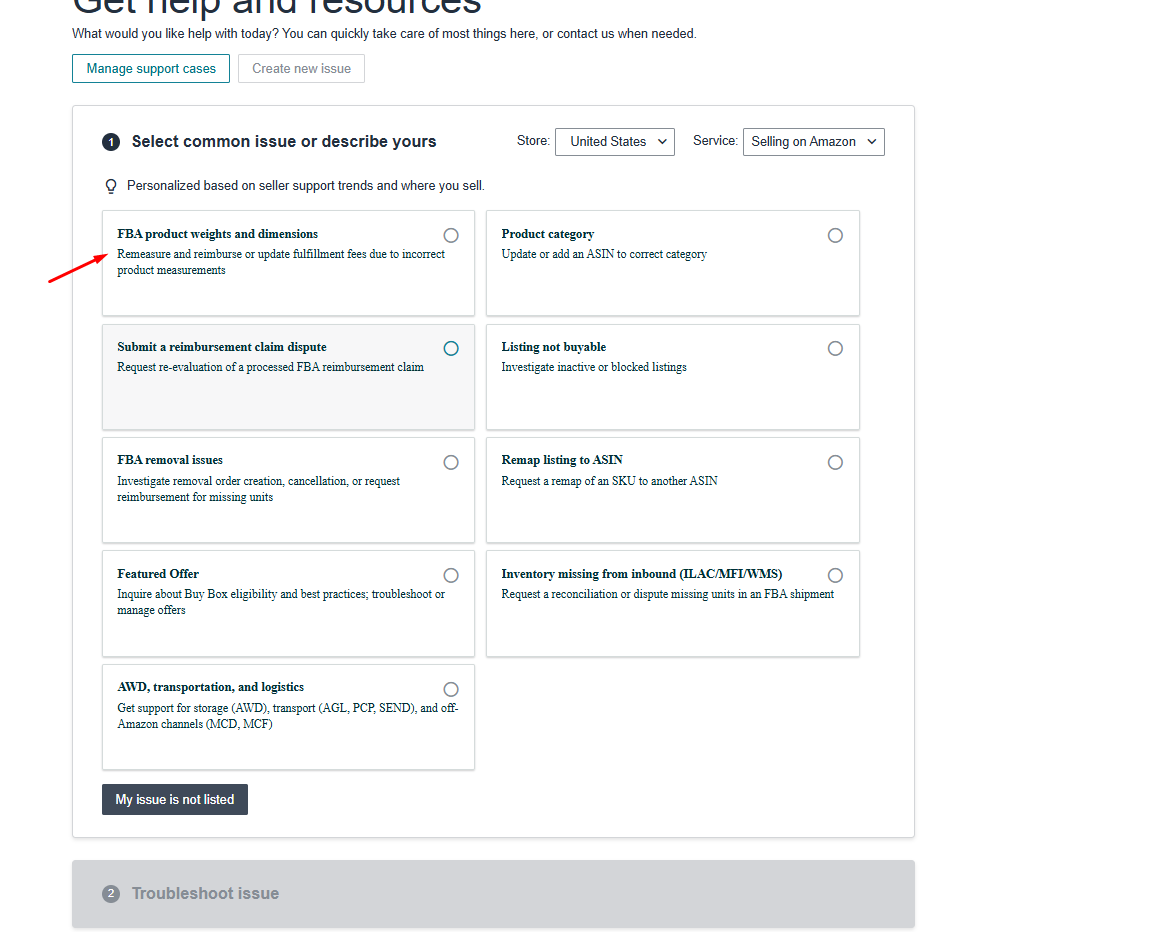
- Pick FBA product weights and dimensions
Keep Store set to your marketplace and Service to Selling on Amazon. If the tile isn't listed, describe the issue instead.

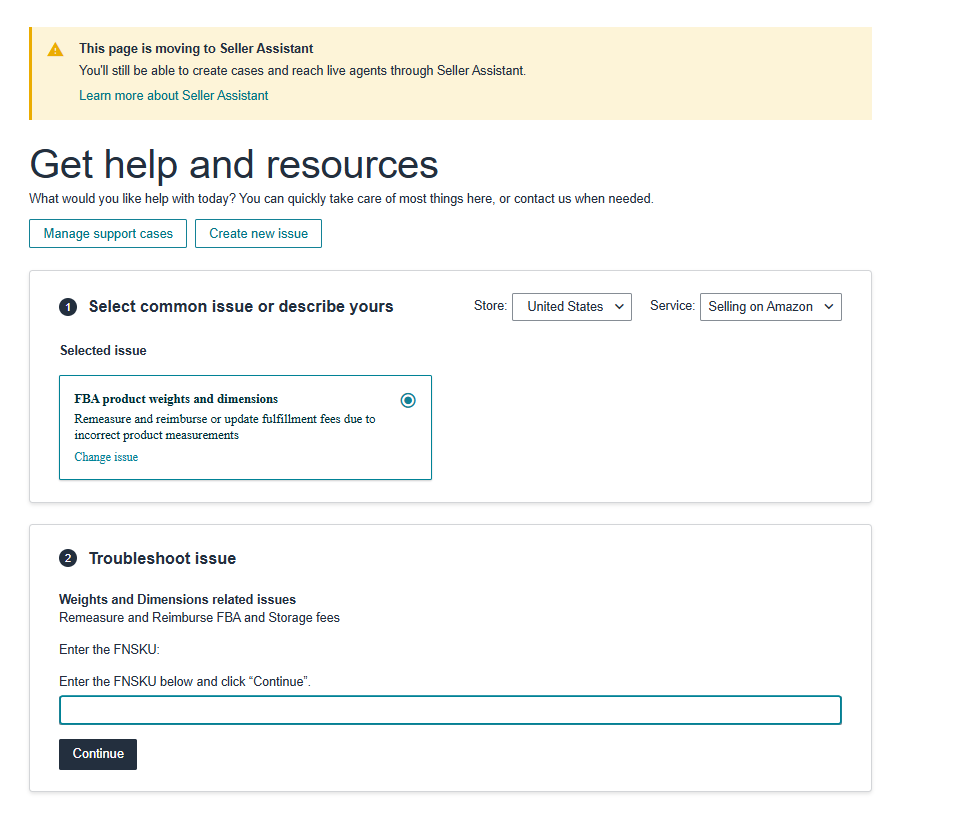
- Enter the FNSKU and click Continue
The FNSKU is the Amazon barcode on your units (it starts with X0 for most products). You'll find it in Manage All Inventory.
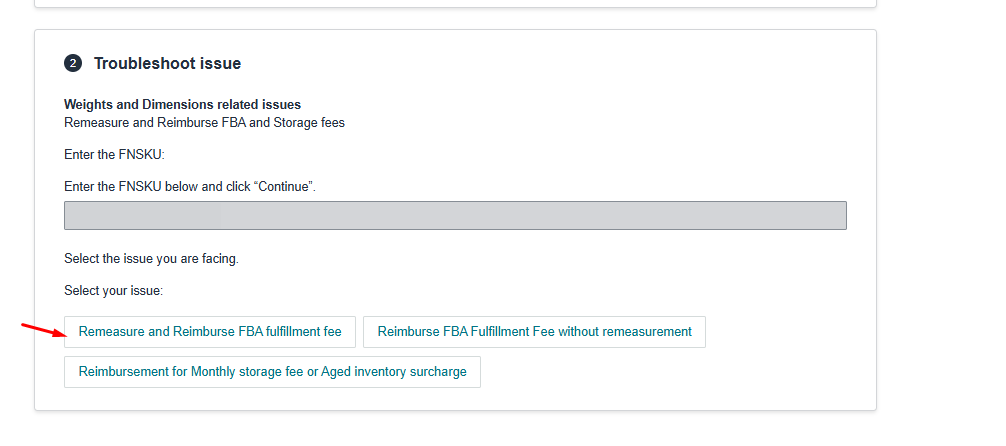
- Choose Remeasure and Reimburse FBA fulfillment fee
The other two buttons are for a refund without a new measurement, and for storage fees or aged-inventory surcharges.
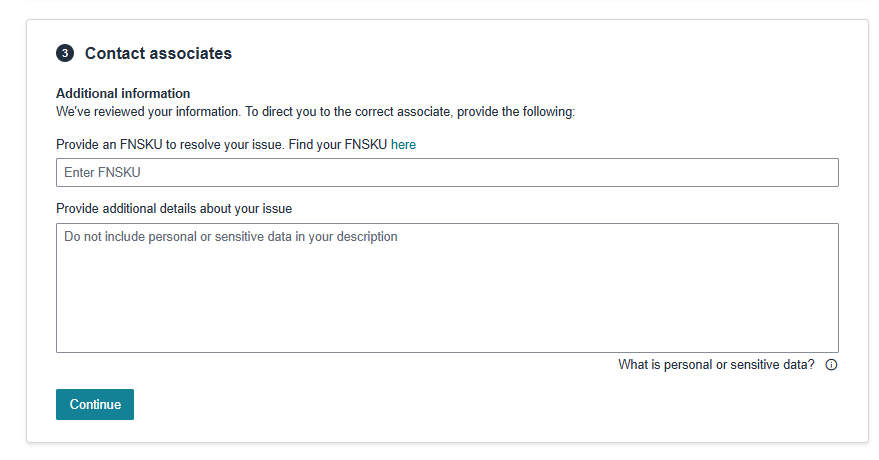
The older form. In some accounts, searching Help for FBA Fees Overview Remeasurement opens the same request in a side panel.
- Enter the FNSKU or ASIN
Select Remeasure and reimburse Fulfilment by Amazon fulfilment fee, then Next.
- Check the details on file
The panel shows the parcel dimensions and weight Amazon uses, how many requests you've sent this month and the monthly maximum (20 here). Click Yes when asked if you have the product's weight and dimensions.
- Pick the reason and enter your measurements
Enter length, width, height and weight in the units shown, which can be centimetres and kilograms. Then Next.


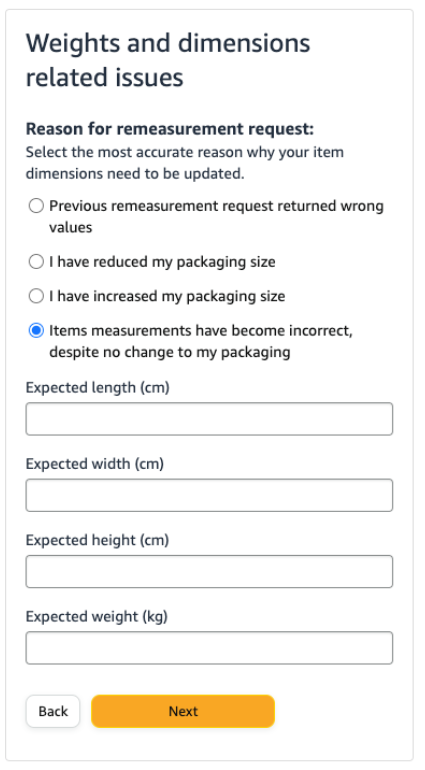
| Reason | Use it when |
|---|---|
| Measurements became incorrect, packaging unchanged | Nothing changed on your side, but Amazon's figures are too big |
| I have reduced my packaging size | You've moved to smaller packaging, and Amazon still has the old size |
| I have increased my packaging size | Your packaging got bigger, so Amazon's figures are now too small |
| Previous remeasurement returned wrong values | You asked before and the new figures are still wrong |
Claiming back what you overpaid
Sometimes Amazon refunds the extra fees when it fixes the dimensions. If it doesn't refund all of it, you can open a claim, but only for the last 90 days of overcharged fees. Wait until Amazon confirms the new dimensions and fee before you start.
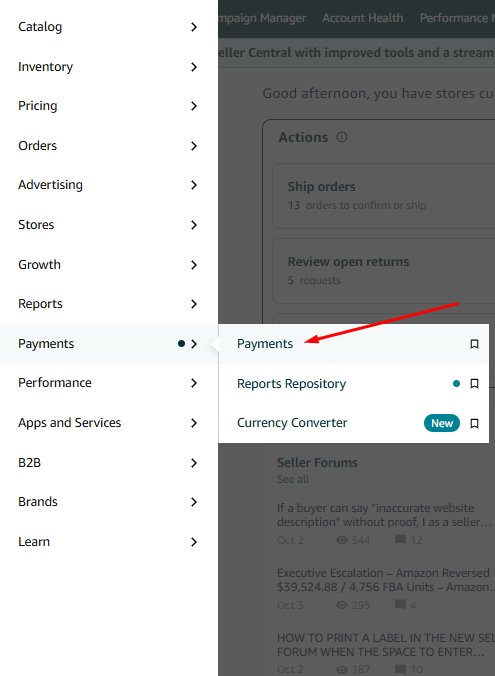
- Open the Payments Dashboard
Seller Central›Menu›Payments›Payments
- Open Reports Repository
It's the last tab on the Payments Dashboard.
- Request the transaction report
Account Type All (Unified Reports), Report Type Transaction, a custom date range covering the last 90 days, then Request Report.
- Download the CSV
Refresh until the Download button appears.


- Keep only orders
Filter the type column to Order, and the SKU column to the product.
- Find the FBA fee
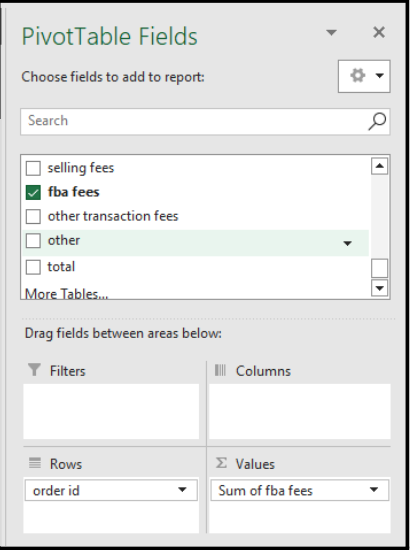
The fba fees column holds the fee on each order. Fees are shown as negative numbers.


- Add a pivot table
In a new sheet: order id in Rows and Sum of fba fees in Values. Copy it and paste as values so you can add columns.
- Hide the correct ones
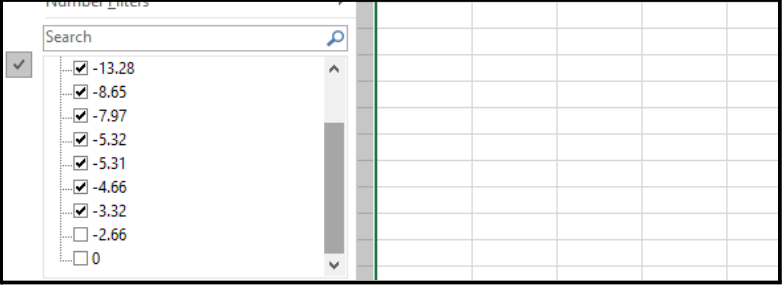
Filter the fee column to leave out orders already charged the correct fee (and zeros).
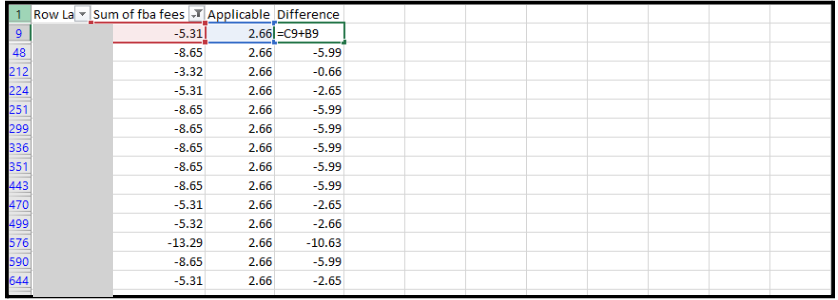
- Add the correct fee and the difference
Column Applicable: the fee the product should pay. Column Difference: fee + Applicable (for example
=C9+B9). Because fees are negative, a negative difference is the amount you were overcharged.
- Open the claim
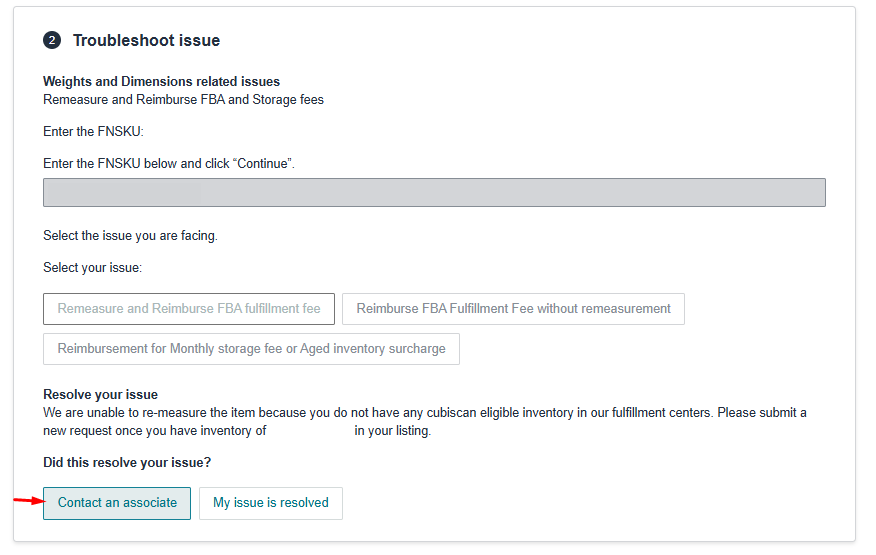
Enter the FNSKU. If Amazon has already corrected the dimensions, choose Reimburse FBA Fulfillment Fee without remeasurement; otherwise contact an associate.
Seller Central›Get help and resources›FBA product weights and dimensions
- Describe it
Give the ASIN, the date Amazon corrected the dimensions, the correct fee and the total overcharge. Attach the summary file.
- Follow up
Reply on the same case, not a new one, and keep the case number in your log.
ASIN B0XXXXXXXX was measured too large and charged the large standard FBA fee.
After the re-measurement on [date], the fee is now $2.66 per unit.
In the last 90 days we were charged $[total] more than the correct fee (summary attached).
Please reimburse the difference.
Checking the fee is fixed
- Check the fee preview
Search the ASIN and open the fee preview. It should show the new dimensions and the lower FBA fee.
Seller Central›Inventory›Manage All Inventory
- Check a new order
Open an order shipped after the change, click its total, and check the FBA fee in the breakdown.
Seller Central›Payments›Transaction View
- Check the refund
In the reimbursements report, filter to the SKU over the last 365 days to see whether the claim was paid.
Checklist
- Measured and weighed a packed unit, with photos
- Checked my own listing and shipment entries for carton figures
- Compared Amazon's dimensions and tier with mine
- Submitted the re-measurement request with the right reason
- Amazon confirmed the new dimensions and fee
- Built the 90-day overcharge summary
- Opened a reimbursement case if the refund wasn't complete
- Checked the fee on a new order and the reimbursement report
Related guides
- Smaller packaging to drop a size tier (including vacuum sealing)Repackage soft or bulky products so they fit a cheaper FBA size tier, and check the saving before changing production. With a calculator…
- Avoiding the low-inventory-level feeWhen Amazon adds a low-inventory-level fee to FBA orders, how to see which products are at risk, how to find what you've already paid, and…
- Lower referral fees on case packs with Amazon Bulk ServicesLink a single unit to its case pack in Amazon Bulk Services and get 15–25% off the referral fee on the case. Who qualifies, how to set it…