
What it is and why
Once a month, check the profit report: the exact profit each listing generated, with all the revenue and expenses it generated by itself. Compare it with your profit goal for each listing to make sure you're on track.
The point is to take the time to go over every product in the brand: make sure nothing is bleeding or working differently than expected, and spot positive trends fast.
| Goals | Actions you'll take from it |
|---|---|
| Better financial control and a stronger business pulse | Set the monthly TACOS range for every product |
| Find bleeding SKUs and markets, and why they bleed (marketing, refunds, etc.) | Identify bleeding products and the reason, and add tasks to fix them |
| Identify the best-selling SKUs | Confirm the best sellers and prioritize them in day-to-day work |
| Infrastructure for delegation and scale |
How often: once a month. Check the monthly report in depth, dig into specific bleeding SKUs, and brainstorm the best actions to improve them.
One-time setup
- Sign up for Sellerboard and bookmark it
- Connect your Amazon store through the API
Every Amazon marketplace you sell in should be connected. Then connect the PPC Ads API from inside Sellerboard, so it downloads the PPC data.
- Enter COGS for each active SKU on the Products page
Cost type: by period/batch/marketplace.
- For FBM SKUs, enter the FBM shipping cost
Products page → column FBM shipping cost: the estimated cost of shipping to a customer.
- Wait 1–2 days
So the software downloads all the relevant past data.
Full setup: Sellerboard account and gross margin preparation.
The owner task
| Field | Value |
|---|---|
| Task name | Check monthly Profitability report |
| Due date and repeat | Every month on the 5th |
| Subtasks | Make sure the VA filled the COGS correctly for the top ASINs · Analyze the report with the process below · Add every follow-up task from the analysis |
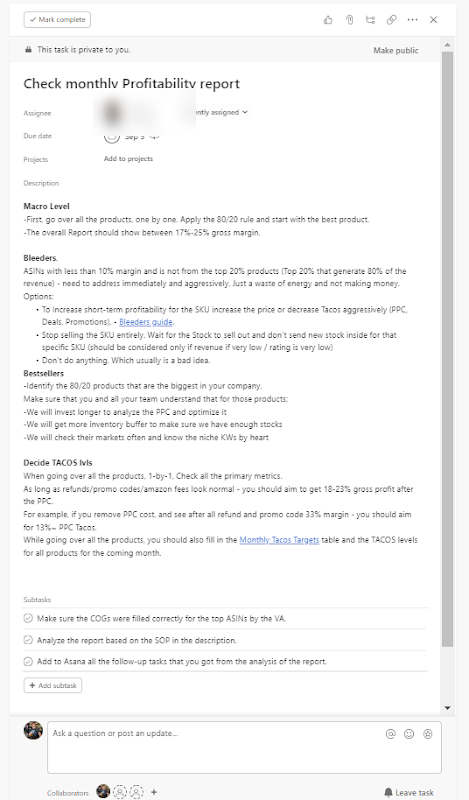
1. Macro level
Go over all the products one by one. Apply the 80/20 rule and start with the best product. For each product, go through every column and understand where the expenses go.
2. Best sellers
Identify the 80/20 products, the biggest in the company. Make sure the whole team understands that for these products you will:
- Spend more time analyzing and optimizing their PPC.
- Keep a bigger inventory buffer, to allow growth and minimize the chance of running out of stock.
- Check their markets often, know the niche keywords by heart, and know where the biggest competitors stand.
3. Bleeders
ASINs with a margin below 10–14% that aren't in the top 20% of products need to be addressed immediately and aggressively: they waste energy and don't make money.
| Option | When |
|---|---|
| Lower TACOS aggressively (PPC, deals, promo codes…) | TACOS is the main bleeding point. See the Bleeders report. |
| Test a higher price and watch performance | The core margin before PPC isn't good enough (below 28–32%) |
| Stop selling the SKU | Let the stock sell out and don't send more. Only if revenue or rating is very low. |
| Do nothing | Usually a bad idea |
4. Profit margin and TACOS targets for next month
Review every product one by one. Decide the profit margin % you'll aim for next month for each product: that sets the TACOS level to aim for.
Last month 14% → you want 17%: aim for 15.5% this month and 17% next month.
Last month 29% → you can decide to push and aim for 25% this month.
Once you know the margin target, look at last month's marketing spend: it's the biggest variable you control. Calculate last month's TACOS and adjust it to reach the margin you want.
Last month's marketing cost per product is the sum of:
| Cost | Where to find it in Sellerboard |
|---|---|
| PPC | The Ads column |
| Promo codes + Lightning Deal discounts | The Promo column (includes both) |
| Coupon redemption fees | Account data window at the top → More → Amazon fees → Coupon redemption fee. It covers the whole account: estimate how many redemptions each product had and split the fee. |
| Lightning Deal fees | Same place → Lightning Deal fee |
| Any other ad spend | Outside traffic, Amazon DSP, etc. |
Divide the total marketing cost by the product's revenue: that's last month's TACOS.
Last month's revenue, ads, promo, coupon and deal fees and profit margin to last month's TACOS and the TACOS that reaches your target margin next month.
Want these numbers for your own account? Get a free audit →- Review last month's profit margin
- Decide the target profit margin for the coming month
- Calculate last month's TACOS
- Adjust that TACOS by the margin change you want
That's the new target TACOS for the month.
- Note the target TACOS
In the TACOS Targets tab of the finance tracking workbook ↓. Use the weekly meeting to monitor marketing and reach it.
If you don't follow this process
At least make sure that:
- You can see your store's gross margin with at least 95% accuracy
- You spend a few hours on your numbers at least every two months (monthly recommended)
- You have a simple way to spot bleeding products and why they bleed
- You review each product's advertising budget monthly and set budgets for the coming month(s)
Related guides
- Sellerboard account and gross margin preparationOpen Sellerboard, connect your store and ads, fill in landed cost per ASIN, share access, and fill in the product and freight cost in your…
- Adding your monthly expenses to SellerboardSellerboard shows your store's gross profit; add the business expenses Amazon doesn't see (3PL, VAs, interest, software, outside…
- Monthly balance checkAdd up every asset once a month (cash, the Amazon balance, inventory value) to confirm the company really made a profit, that it roughly…
- Setting your PPC target TACOSSet a target TACOS for each parent ASIN from its margin, competition and lifecycle stage, change it gradually each month, and check it…
- Bleeders reportEvery week, find the targets and search terms with 10+ clicks and no sales, then pause the targets and add the search terms as negative…