
What it is
The Amazon Store is a smaller version of your brand's website inside Amazon: a home for your whole catalog and brand content, where shoppers browse apart from search results. With lifestyle visuals and captions you have more room to tell your brand's story and purpose, so customers see a REAL brand, not just another Amazon brand.
| Part | What it is |
|---|---|
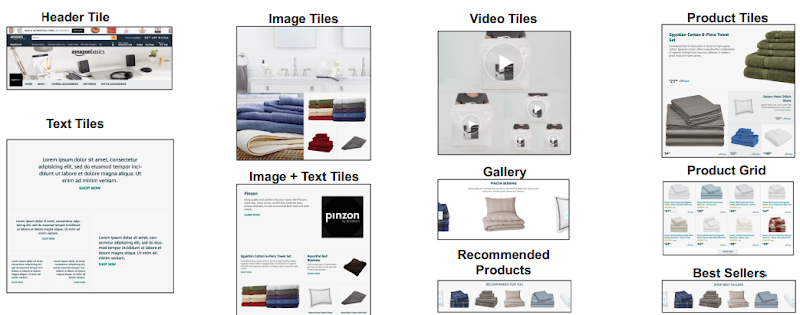
| Header | A large hero image, the logo and the navigation bar on every page |
| Pages | The store's pages, which also form the navigation menu |
| Sections | The horizontal rows of a page, which hold tiles |
| Tiles | Content widgets: text, image, video and product tiles |

Building it
| Tool | Use |
|---|---|
| Page manager | Create, select, move and delete pages |
| Preview window | Live view of the page; select a tile to edit |
| Section manager | Add, edit, move and delete sections |
| Status bar | Modification status and errors |

| Template | Use |
|---|---|
| Product collection | Many products, like a category page: shows the full range and grows basket size |
| Product highlight | One product (a new release or an offer), or a set with related content |
| Marquee | Brand story and categories |
| Blank | Start from scratch with any tiles |

| Tile | What it does |
|---|---|
| Product | One product with price and Prime status, linking to its page |
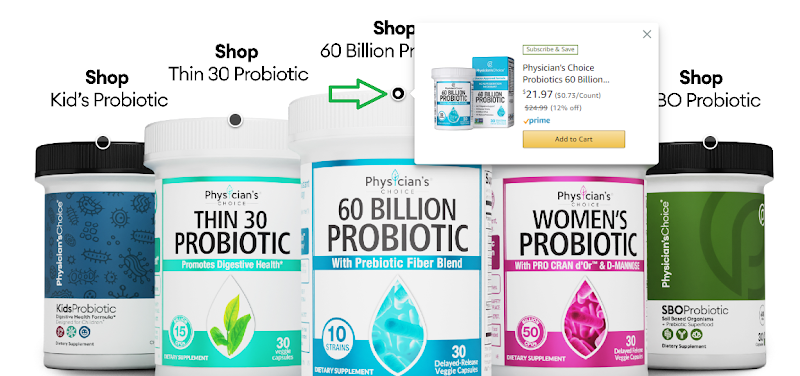
| Shoppable image | Up to 6 products on an image with interactive points (name, image, Prime, price, rating, buy actions), each linking to its page |
| Best sellers | Your brand's top sellers, 5 at a time, automatically |
| Product grid | Products in a grid with title, image, price, Prime, rating and Add to cart |
| Recommended products | Your products recommended from the shopper's history, 5 at a time |
| Text / Image | Free text or an image, linking to a store page or product page |
| Video | A player shoppers control |
Why it sells more
- A good-looking store with a strong brand message raises the chance customers buy from you; showing best sellers with their alternatives and complementary products raises AOV and sales.
- Best sellers with a shoppable option on the home page are seen immediately and are one click from purchase.
- Separate pages by product type (e.g. hoodies, t-shirts) give more information per product and more chances to sell.
Good examples: brand stores like Earth Rated, Hero Cosmetics, Physician's Choice and Goli use strong visuals, put best sellers on the home page, and make them shoppable.
What to do
- No store yet? Build one
A good-looking store with all your products on separate pages. A freelance designer experienced with Amazon brand stores (99designs, Upwork) can design and structure it.
- The most important step: best sellers on the home page
When someone opens your store, your best sellers should be visible immediately, with shoppable tiles linking to their product pages. Pick the shoppable section type that fits the home page design.
Check it: open your store from a product page (the link under the title), go to the home page and click the shoppable tiles: they should open the product page (some open an Add to cart pop-up instead).

Related guides
- 5–10% off green badge promotions for cross-sellingA "Buy 2, save 10%" percentage-off promotion puts a green badge next to your price and a Shop items page with your other products: more…
- Insert cards for cross-sellingA small card in the package that promotes your other Amazon products with a discount on the next purchase: more cross-sales and loyalty,…