
Overview
| Lightning Deal | Best Deal | |
|---|---|---|
| Duration | Up to 12 hours | 1–14 days |
| Maximum cadence | One per week, all marketplaces | US/CA: 21-day cooldown between deals · UK/EU: 7 days |
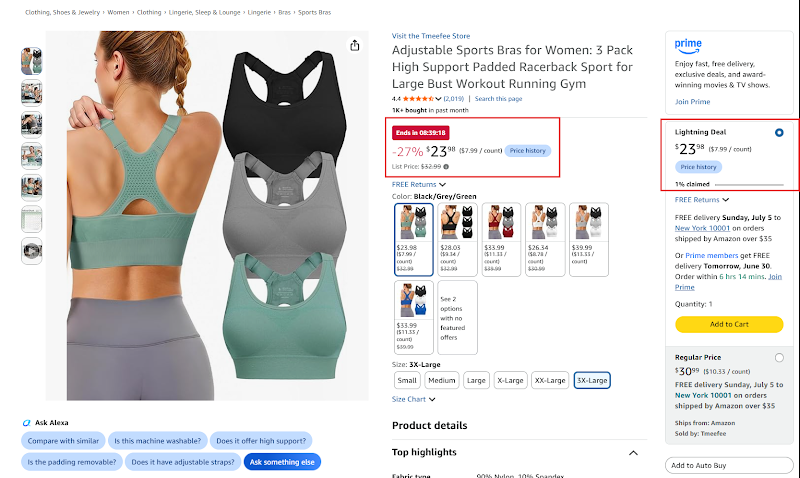
| On the listing | Countdown timer with time and units left (scarcity and urgency), and a badge in search results | A badge in search results for the whole deal |
| Cost and discount | See the deal & price discount requirements ↓ | See the deal & price discount requirements ↓ |

Deal fees (US, 2026)
| Non-peak days | Peak events (Prime Day, Prime Big Deal Days, Black Friday / Cyber Monday) | |
|---|---|---|
| Upfront fee | $70 per day | $100 per promotion (rates may vary by event) |
| Variable fee | 1.0% of sales, capped at $2,000 | 1.5% of sales, capped at $5,000 |
- You pay the upfront fee even if the deal produces no sales.
- The variable fee is calculated on the deal price, i.e. what the customer paid after the deal.
- Early bird: submitting early saves $50 on the fixed fee per peak deal. Early-bird deadlines vary by event; in 2026 Prime Big Deal Days deals had to be submitted and scheduled by August 5, and Black Friday / Cyber Monday deals by September 5.
| Event | Upfront fee × duration | Total deal sales | Total upfront fee | Variable fee | Total deal fee |
|---|---|---|---|---|---|
| Non-peak days | $70 × 14 days | $4,200 | $980 | $42 | $1,022 |
| Non-peak days | $70 × 3 days | $900 | $210 | $9 | $219 |
| Non-peak days | $70 × 14 days | $250,000 | $980 | $2,000 (cap) | $2,980 |
| Prime Day 2026 | $100 | $900 | $100 | $13.50 | $113.50 |
| Prime Day 2026 | $100 | $500,000 | $100 | $5,000 (cap) | $5,100 |

Marketplace, deal days and expected sales to the Lightning Deal or Best Deal fee and the extra TACOS it adds.
Want these numbers for your own account? Get a free audit →Why run deals
| Benefit | Detail |
|---|---|
| Sales | A Lightning Deal is typically one of your strongest days of the week; Best Deals often become the strongest 2 weeks of the month. Done right, they're the most profitable part of the month. |
| Competitive edge | If you're a leader in the niche, deals cut competitors' sales, raise their TACOS and weaken their position. |
| Market leadership | Used consistently and with discipline, deals help defend and strengthen leadership long term. |
| Organic rank | Deals lift CTR and CVR, improving organic rank across all keywords without dedicated ranking campaigns. |
- Sales velocity: the more units a day, the stronger the effect. 150+ units a day benefit more than 50 or fewer.
- Niche: in some niches deals are exceptional, in others good but less significant.
- Deal price: in competitive niches the price matters as much as the deal: test several.
- Test deals on your best sellers first to see how they do in your niche.
Best Deals or Lightning Deals?
Best Deals consistently outperform Lightning Deals, including on products with lower daily sales: the longer run gives the algorithm time to surface the offer and build momentum.
| You can run | Do |
|---|---|
| Both | Start with a Best Deal. When it ends, review sales and profit, then decide on another next month. |
| Only Lightning Deals | Submit the first and schedule 3 more for the following weeks (4 in total), so you judge on enough data, not one week. Switch to Best Deals as soon as the ASIN is eligible. |
Eligibility
- Professional selling account with at least a 3.5-star seller rating.
- Product rating of at least 4 stars in the US and CA, 3 stars in the UK and EU.
- Account not in holiday mode.
Book your deal calendar early
Amazon opens a rolling booking window of about 8 weeks. Slots go to the strongest ASINs first and roll down if they aren't booked, so waiting can lose you a slot. You can cancel until the day before a deal starts.
- Block a recurring 1-hour Deals Review every week
An operational task, not something you do when you remember.
- Book every new slot that fits your strategy
Always the full 2-week Best Deal: a 1-week deal triggers the same cooldown with much less exposure. If only 1 week is open, wait a week for the full 2. Add booked deals to the team calendar so inventory, pricing and PPC are planned.
- Check every deal starting in the next 1–2 weeks
See the checklist.
- Inventory at child ASIN level: if the main traffic child may go out of stock, cancel or postpone; if only secondary children are low, remove them
- Not restricted to Prime customers only
- No committed quantity on the Best Deal
- No pricing errors, and the highest deal price Amazon allows
- Still profitable after discount, deal fees and expected returns
- PPC budget and bids planned before the deal starts
- The right SKU is enrolled
Creating a deal step by step
- Open Manage promotions and deals
Seller Central›Marketing›Manage promotions and deals

- Click Create promotion, then Create Deal
The same menu creates Buy X, Get Y promotions, Price Discounts and Coupons. Promotion Performance shows how past promotions did.

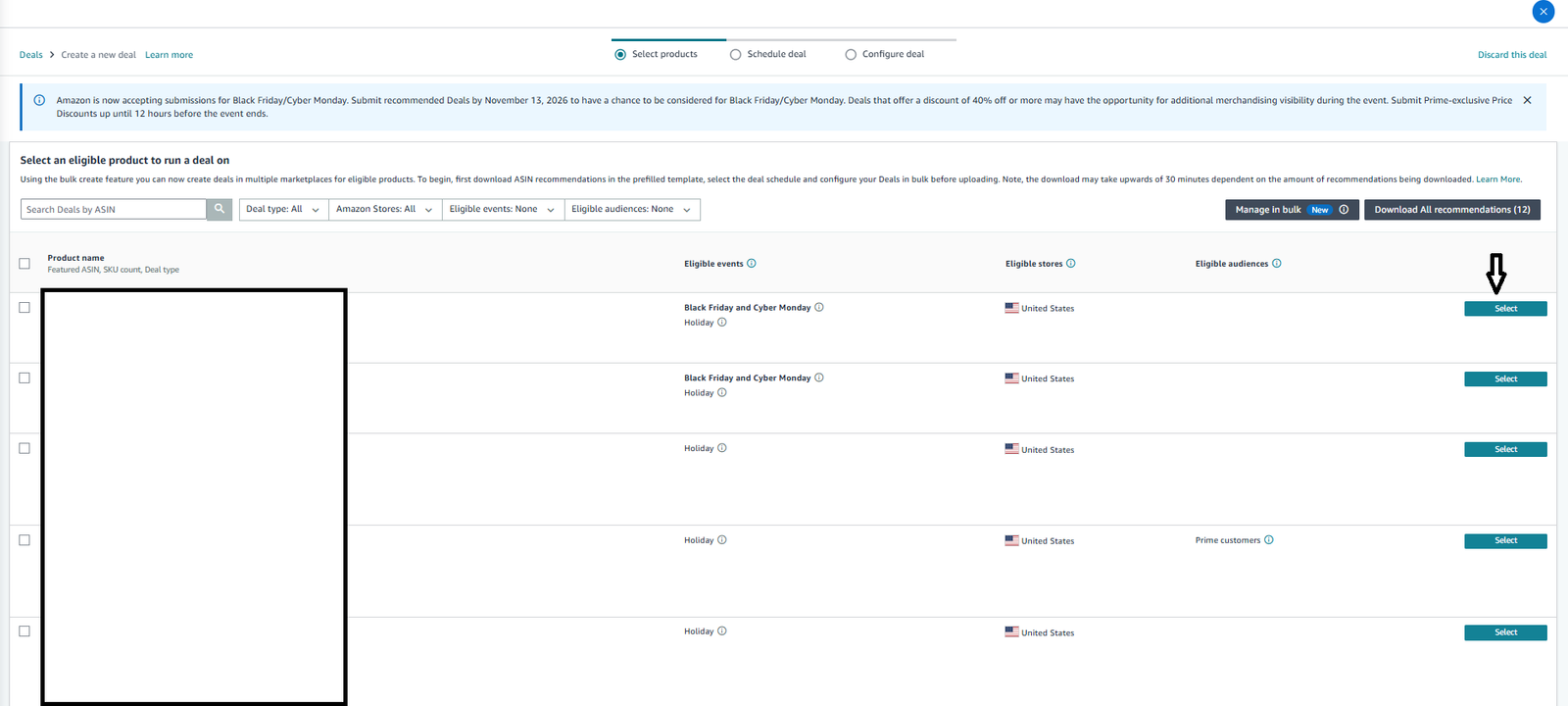
- Select products
Only eligible products are listed, with their eligible events (e.g. Black Friday and Cyber Monday, Holiday), stores and audiences. Filter by deal type, store, event or audience, then click Select on the product. To create deals for many products or marketplaces at once, use Download All recommendations / Manage in bulk: fill in the schedule and deal setup in the prefilled template and upload it (the download can take up to 30 minutes).
- Schedule the deal
Choose the Amazon store and the audience (All customers, not Prime customers only). The page shows the fees for this deal. Under Schedule, pick Custom Schedule or an event window (in 2026: Holiday, Sun Nov 1 – Dec 24; Black Friday and Cyber Monday, Thu Nov 19 – Nov 30); the start and end dates fill in. Click Continue to next step.

- Configure the deal and submit
Set the deal price (the highest Amazon allows: see Maximize your deal price below) and leave the committed quantity empty. The reference price shown here tells you whether your List Price is validated. Run the checklist above before you submit.
Suppressing a running deal on one SKU
You can stop a deal on one SKU without cancelling the deal, e.g. when the hero SKU (usually locked in the deal) is low on stock, or a SKU's deal price isn't profitable. Use the Minimum price field in Manage Inventory.
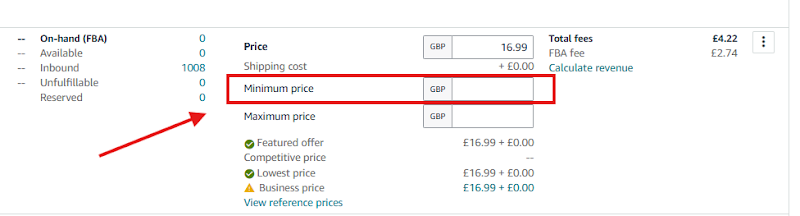
Normal price $24.99, deal price $19.99, low stock on this SKU.
Set the minimum price above the deal price and below the normal price, e.g. $22.99: the deal price is suppressed and the normal price takes over.
Careful: a minimum price above your normal price suppresses your Buy Box.
Stay under 50% time on promotion (US)
Since May 2026, if a product is on promotion (Best Deal, Lightning Deal, price discount, etc.) more than 50% of the last 90 days, the deal price must be at least 5% below the Was price (90-day median). Promoting too often keeps lowering your future maximum deal price.
- Keep products on promotion under 45 of 90 days.
- Run 2-week Best Deals followed by the 21-day cooldown, with no Lightning Deals between them: about 40% of the time.
- US & CA: back-to-back Best Deals plus Lightning Deals easily exceed it. UK & EU: back-to-back 2-week Best Deals can too.
- Close to or over the threshold? Postpone or skip promotions until it drops back. Check it in every weekly Deals Review.
Days on promotion in the last 90 days against Amazon's 50% rule that forces deeper deal prices.
Want these numbers for your own account? Get a free audit →Maximize your deal price
Amazon caps the deal price with several rules (see the requirements ↓). The higher your maximum deal price, the easier it is to run profitable deals with strong conversion.
| Lower your future lowest 30-day price | Don't |
|---|---|
| Coupons | Subscribe & Save discounts and coupons |
| Price discounts | Buy X, Get Y promotions |
| Brand Tailored Promotions | Promotions during peak events |
| Business pricing and quantity discounts | |
| Creator Connections discounts |
Plan every promotion, and avoid unnecessary discounts, coupons and tailored promotions before big deals.
Lever 2: a validated List Price. A genuine, validated List Price raises your maximum deal price and shows bigger strike-through savings during the deal. Validate it with the List Price guide, then check in the Deals dashboard whether your maximum deal price went up. If not, the limit is probably still the lowest 30-day price: wait for the 30-day history to refresh.
Managing PPC TACOS during deals
A deal discount works like PPC spend: a $1.17 discount costs about the same as $1 of PPC (after the lower referral fee). So on deal days, controlling TACOS is what protects your margin, and it's what separates the best PPC managers from average ones.
- Set the margin goal and target TACOS
In the pricing table, read the gross margin at the deal price. Example: 37% normally, 25% on the deal. Want 15–18% after PPC? 25% − 15% = 10% TACOS; 25% − 18% = 7%. That's the deal-day target.
- Estimate revenue and budget
Predict deal-day revenue from past deals and multiply by the high end of the TACOS range: $5,000 × 10% = $500 PPC budget.
- Work out the cut
The evening before, open Campaign Manager twice: yesterday, and the last 30 days. Spent $750 yesterday? Expect at least that tomorrow (the badge brings more clicks). Target $500 → cut $250.
- Cut the worst campaigns first
Last 30 days sorted by ACOS. With a 35% break-even: ACOS > 55% → budget $1; SB/SBV/SD with ACOS > 40% → $1. Keep cutting high-ACOS campaigns until you reach the amount. Note every change so you can restore it.
- Raise budgets on great campaigns
Check last year's lift on a deal day (e.g. $2K → $4K = 2×). SP campaigns with ACOS < 20% that ran out of budget: 2–5× lift → double the 30-day average daily spend; 5–10× → triple it.
- Keep ranking campaigns on
Even at high ACOS. If you already rank high and want to spend less on ranking, cut those budgets first.
- Restore all budgets after the deal
Gross margin at the deal price, the margin you want after PPC, expected revenue and yesterday's spend to the target TACOS, the day's PPC budget and how much to cut.
Want these numbers for your own account? Get a free audit →- Remove other promo codes, coupons and promotions during the deal to protect profit.
- Use the higher end of your TACOS range.
- It takes practice, but it makes a lot of money, especially on Prime Day and Black Friday. Use it for every deal from now on.
Related guides
- Prime Day playbookWhether to run a deal or a price discount on Prime Day, the 60-day and 30-day price rules, the List Price exclusion window, inventory…
- List Price (MSRP): setting it and checking validationAdd your genuine List Price on every SKU, check whether Amazon validated it, Amazon's validation rules (90-day lookback, peak-event…
- Pricing table: gross profit margin and the right priceWork out each product's gross profit margin before PPC and refunds, compare it with the 36–42% range, and decide whether to test a lower…