
Two events, one framework
Prime Big Deal Days (PBDD) and BFCM are separate events, but they share the promotion types, price rules, eligibility and strategy, so this playbook covers both and flags where they differ.
These are among Amazon's highest-traffic events: Amazon pushes traffic across search, ads and the homepage. A promotion catches that surge: a sharp lift in conversion, sales and short-term rank that often carries on after the event.
Promotion types and price rules
| Best Deal | Price Discount | Lightning Deal | |
|---|---|---|---|
| Fixed fee | $100 per parent ASIN ($50 if booked early) | $100 for the whole catalog in one discount | $100 per parent ASIN ($50 if booked early) |
| Variable fee | 1.5% of sales, capped at $5,000 | 1.5% of sales, capped at $5,000 | 1.5% of sales, capped at $5,000 |
| Duration | The whole event | The whole event | 12 hours |
| Rule | Best Deal | Price Discount | Lightning Deal |
|---|---|---|---|
| Lowest price, last 60 days (all promotions; US/CA only) | Beat or match | Beat or match | Beat or match |
| Lowest price, last 30 days (all promotions) | 5% off | 5% off | 5% off |
| Current Buy Box price | - | 20% off | - |
| List Price / MSRP | 15% off | 15% off | 20% off |
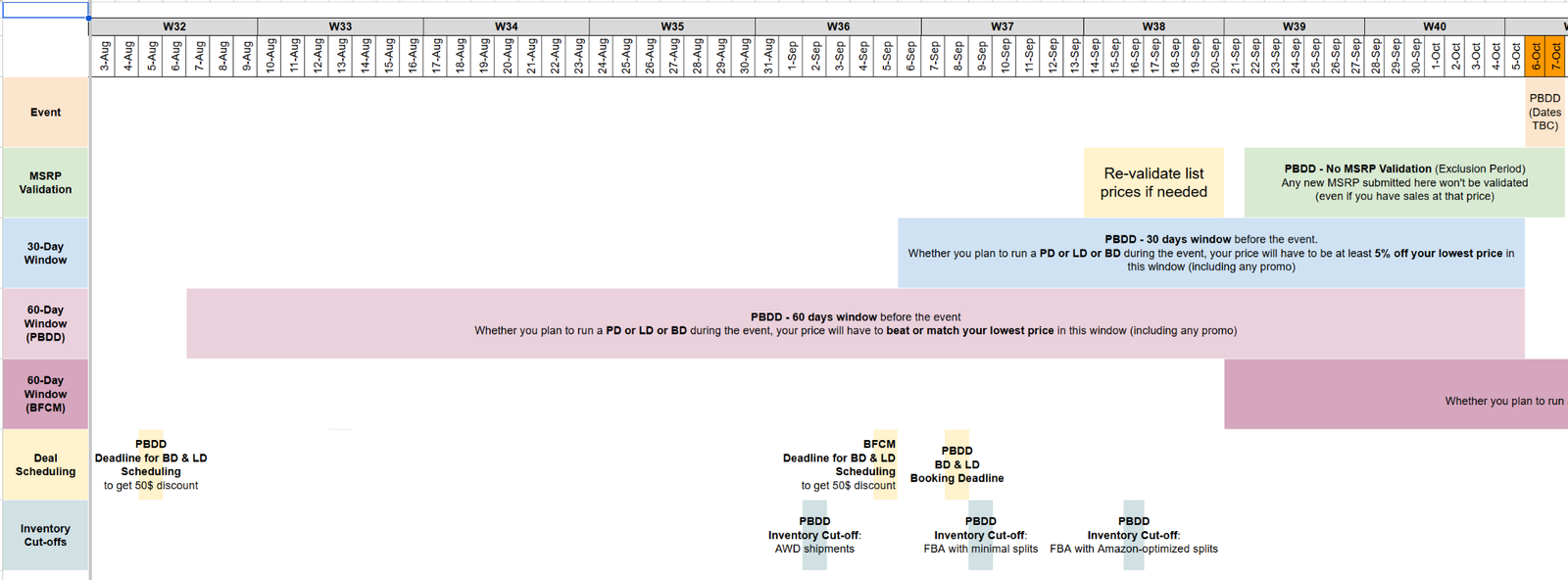
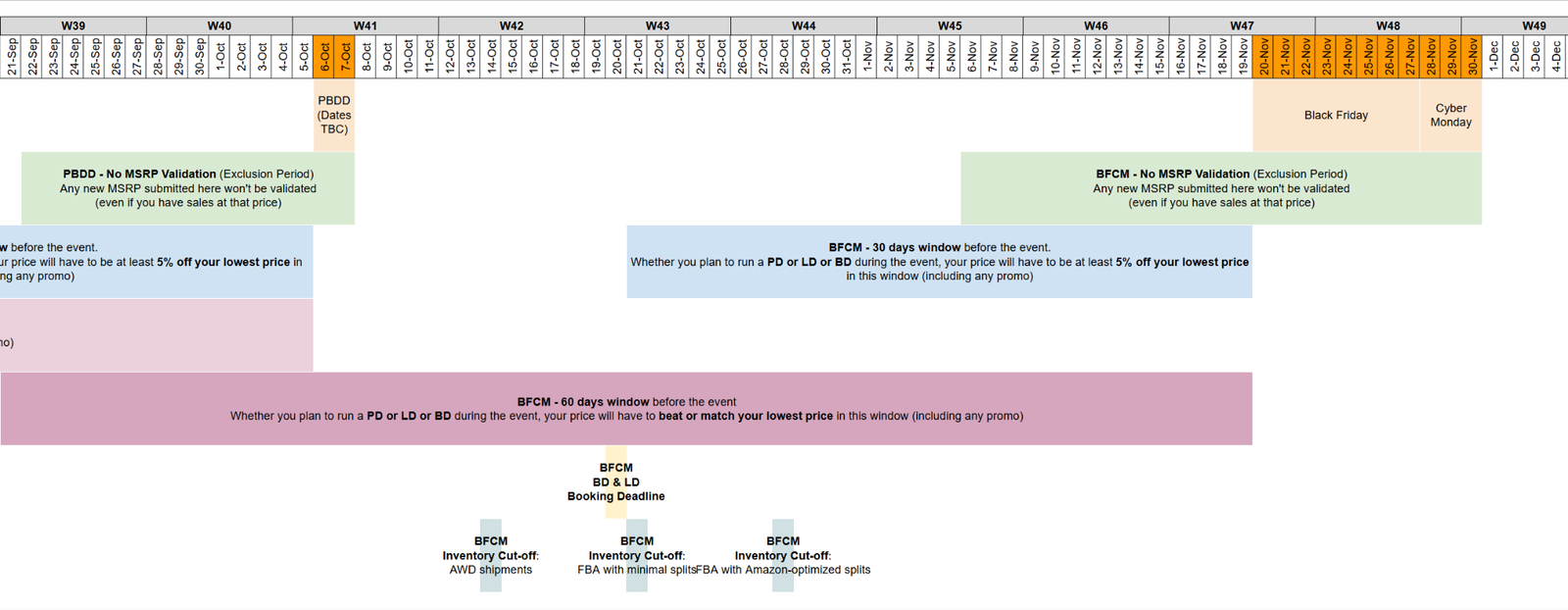
UK/EU rules and every marketplace's costs: Q4 promo calendar & requirements ↓.
| Window | What it means |
|---|---|
| 60-day price floor (US/CA) | Any promotion in it sets a floor you must match or beat during the event: avoid deep discounts you can't sustain |
| 30-day price anchor | Your event price must be at least 5% below any promotion in it: avoid aggressive short promotions that force deeper cuts |
| List Price readiness | Validate a genuine List Price well ahead: nothing is validated in the last ~2 weeks before an event |
Scenarios
| Scenario | What happens | When |
|---|---|---|
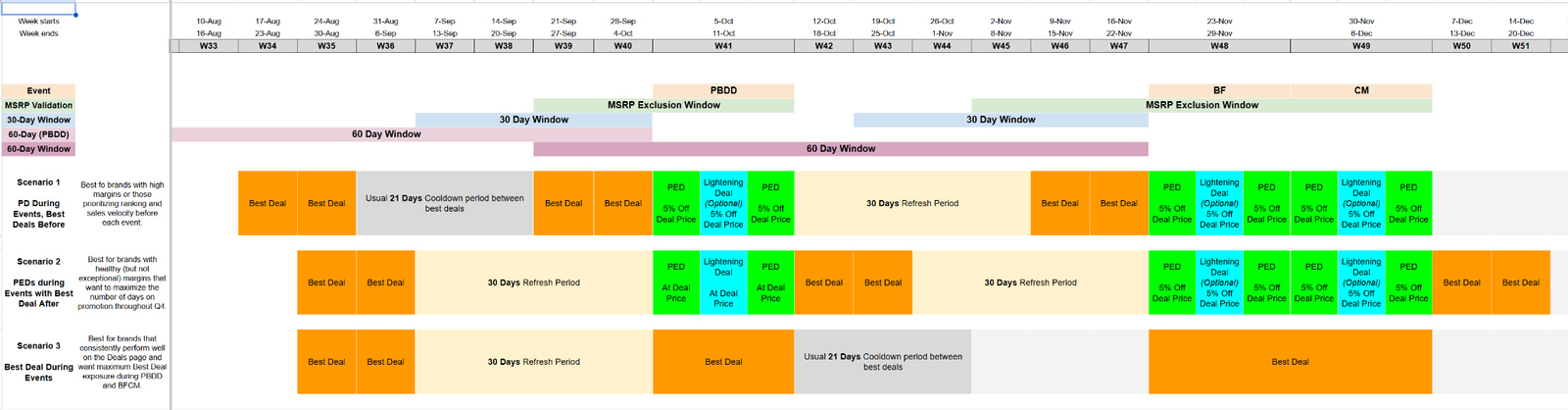
| 1: PD + LD during events, Best Deals before | Best Deals before PBDD/BFCM → price discount during the event with a Lightning Deal on top → Best Deals again after the refresh period | Strong event lift expected, you can afford a deeper discount, ranking and velocity come first, and you want to raise prices after the event for margin in peak season |
| 2: PD + LD during events, Best Deals after (most brands) | Price discount at your target deal price during the event, with a Lightning Deal on top → Best Deals right after → Best Deals through Q4 | You want the most promotion days in Q4, have healthy (not exceptional) margins, and want strong events without deeper discounts |
| 3: Best Deal during events | A Best Deal during PBDD/BFCM | You consistently rank well on the Deals page and its traffic is worth more than pre/post-event Best Deals |
The Q4 promo calendar ↓ lays the scenarios out week by week. In the UK/EU the Best Deal cooldown is 7 days, so more deals fit.
Readiness checklist
- Choose the deal strategy and book early
From the rules, scenarios and your history at these events. Book as early as possible for placement and the lower fee (cancel until the day before). Lock in key parent ASINs first.
- Plan inventory: a hard deadline
Cover the event and after. Missing the inbound cut-off means lost sales and rank at peak traffic. Cut-offs per event and inbound type (AWD, minimal split, optimized split) are in the calendar. No aggressive promotions without confirmed stock.
- Maximize the deal price
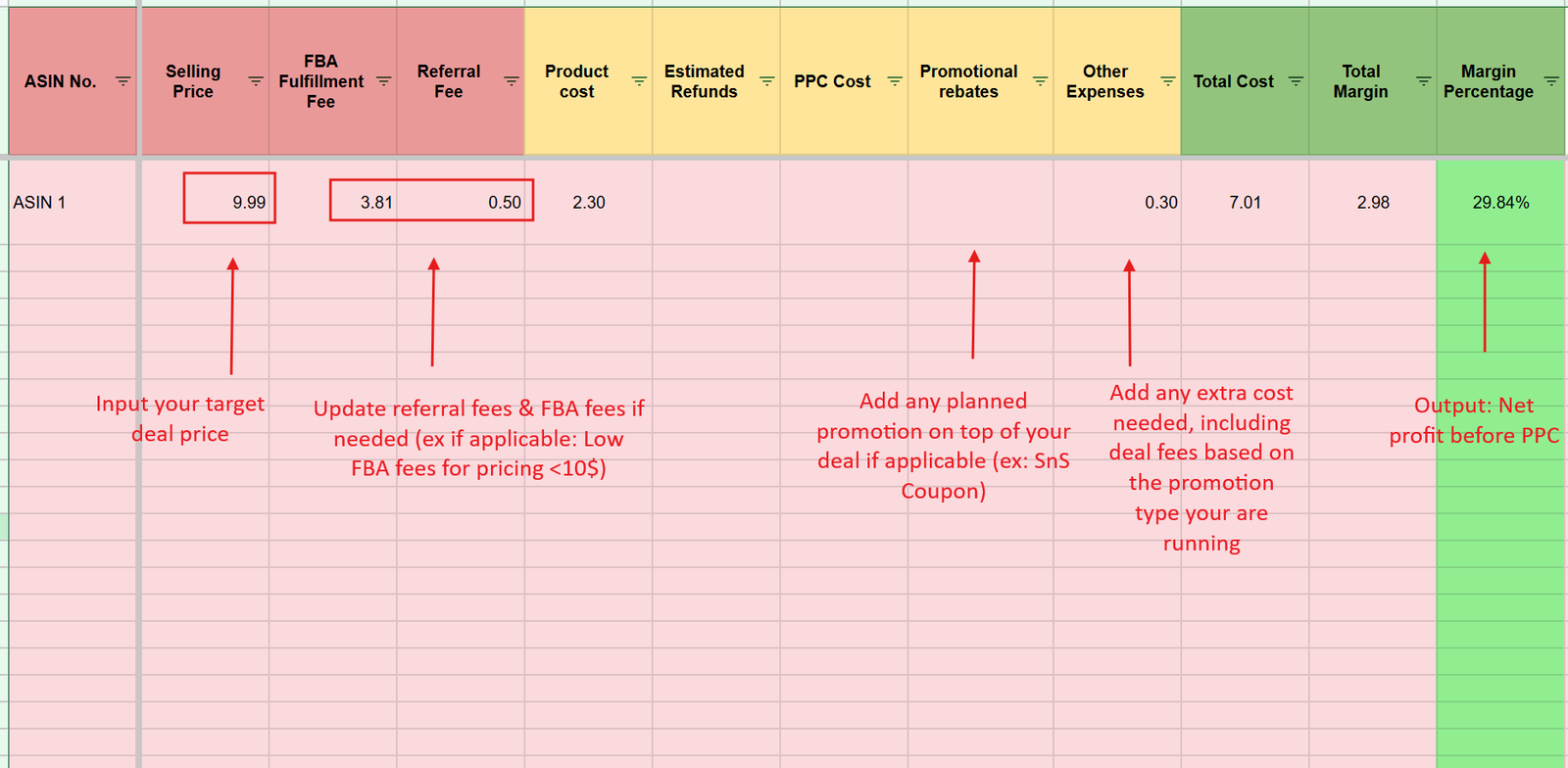
For each child ASIN, find the event price and the rule limiting it with the event price calculator ↓. That maximum event price is the baseline for margin and PPC.
- Check the margin and set a TACOS target
Add a pricing table line at the event price, including deal fees. Margin before PPC too low? Remove the ASIN, unless you have a reason (liquidation, overstock). Acceptable? Set a maximum TACOS: e.g. 30% before PPC → 5% TACOS for a 25% final margin.
- Restore PPC budgets right after the event
Lowest 60-day and 30-day prices, validated List Price and Buy Box price to the maximum Prime Day / BFCM price and the rule that limits it.
Want these numbers for your own account? Get a free audit →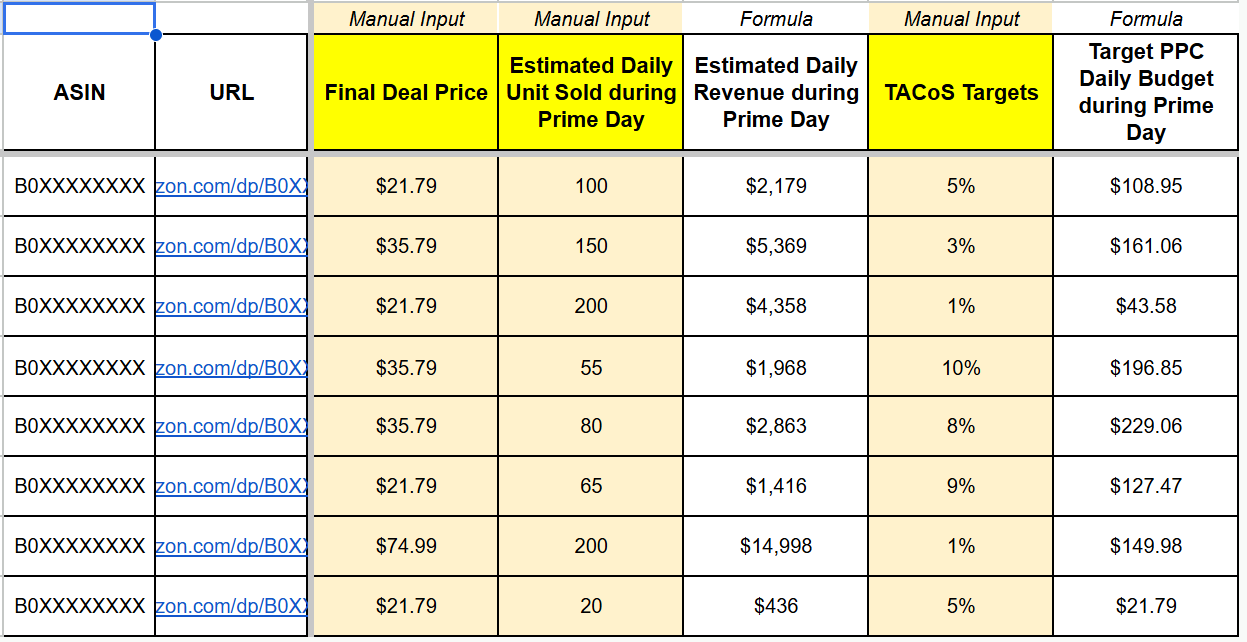
On deal days, control spend with the deal-day PPC method and the Q4 daily TACOS framework.
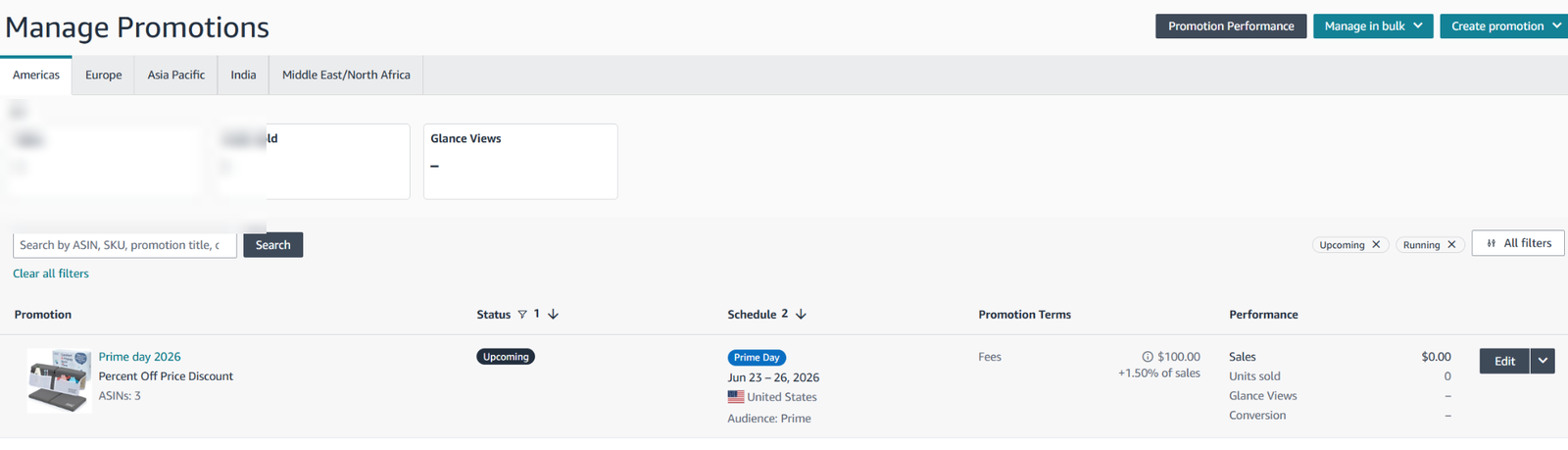
Booking the event price discount (US)
- Open Price Discounts and click Create a Price Discount
Seller Central›Seller Central›Advertising›Price Discounts
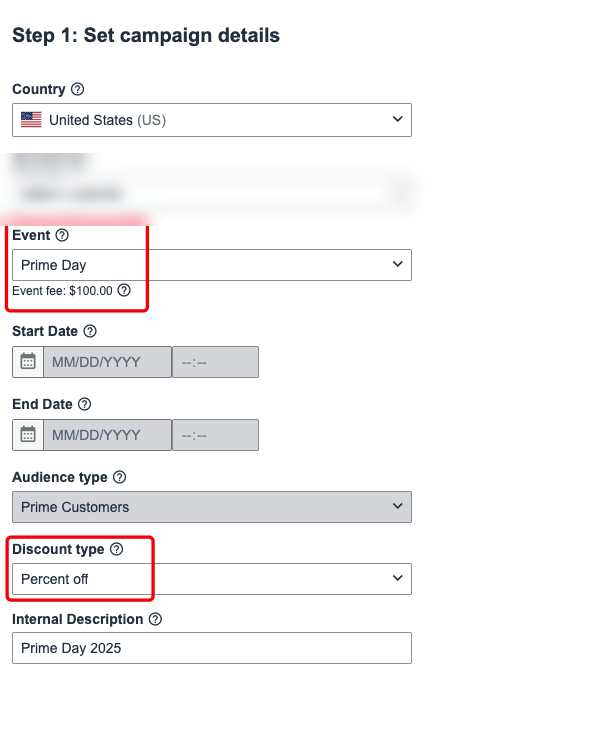
- Campaign details
Country, the event (fee shown), audience, discount type Percent off, internal description.
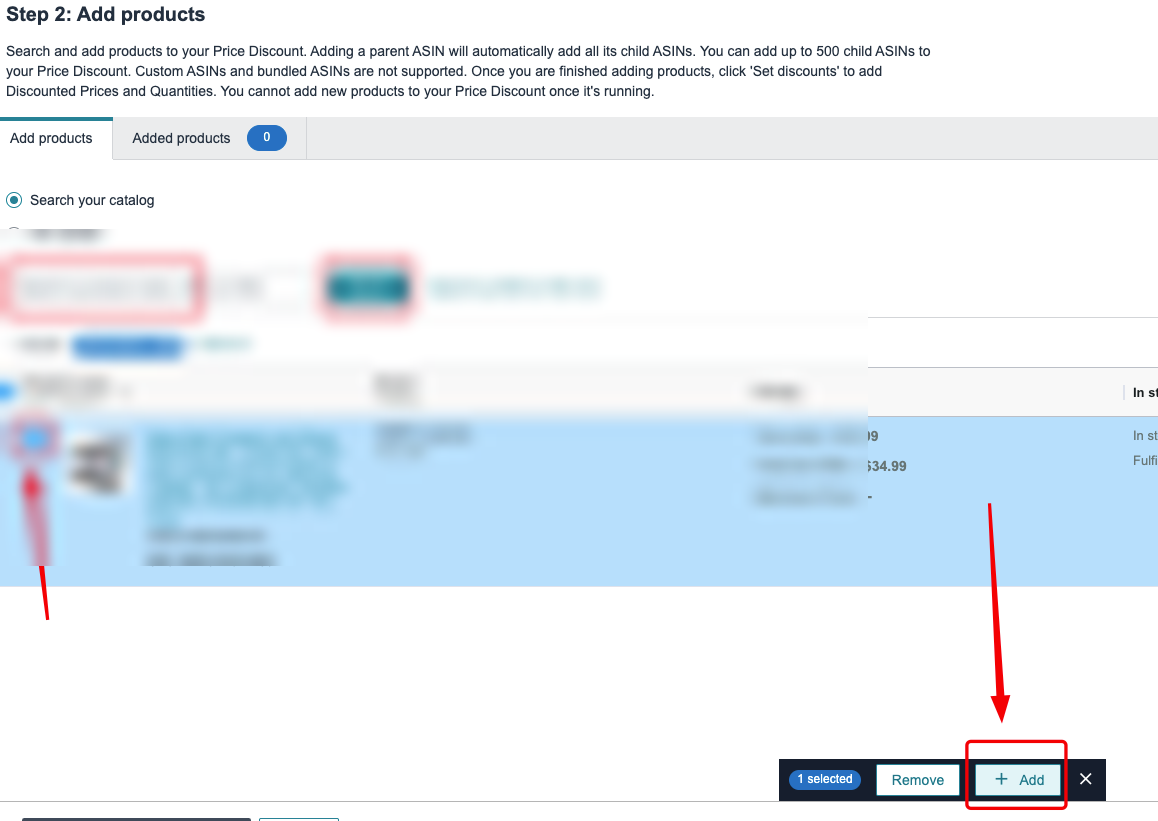
- Add all your ASINs
Search and add them, or bulk upload up to 500 SKUs.
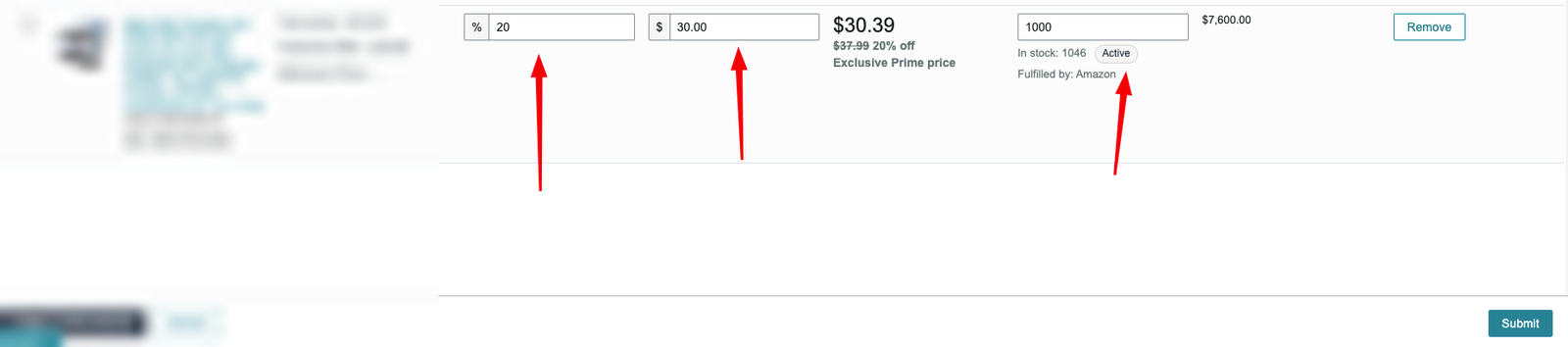
- Step 3: the discount
Percent off 20% · minimum discounted price lower than your current price · committed quantity set high (it doesn't have to match inventory).
- Submit


Related guides
- Prime Day playbookWhether to run a deal or a price discount on Prime Day, the 60-day and 30-day price rules, the List Price exclusion window, inventory…
- Amazon Best Deals and Lightning DealsHow deals work, the 2026 deal fees, why Best Deals usually beat Lightning Deals, eligibility, booking your deal calendar early, creating a…
- Q4 PPC campaign ideas and optimizationExtra Q4 campaigns (last December's SQP keywords, more autos, SBV on converted terms, SD on the whole niche), the daily routine to make…
- List Price (MSRP): setting it and checking validationAdd your genuine List Price on every SKU, check whether Amazon validated it, Amazon's validation rules (90-day lookback, peak-event…