
Introduction and setup
This guide is for established brands: it finds, analyzes and sources products related to your brand. Before researching, know your ideal customer: the products you target should be similar, complementary, or things that customer would want to buy.
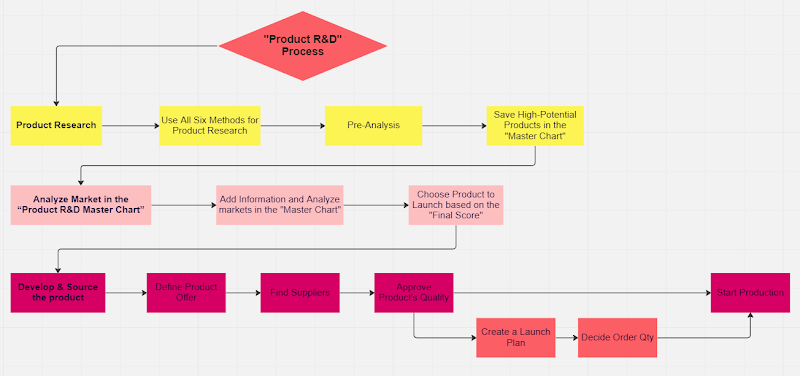
- Copy the product R&D workbook ↓
- Install the Jungle Scout and Helium 10 Chrome extensions
- Helium 10 extension → Settings: enable all options next to Show Search Expander
- Jungle Scout pop-up: turn off Show Jungle Scout's extension and Show Sponsored Products, and tick everything under Customize View
Finding a product, then pre-analysis
Part one: find a single product with high sales velocity and few reviews: probably launched recently and successful, so you could enter this niche and reach high sales within months. Part two: check its niche, to see whether it's an outlier or the market is full of similar new products selling well (the best sign). Find the niche's main keyword by putting the product's ASIN in Helium 10 Cerebro, and make sure the search shows the niche's real competitors (sometimes the subcategory page is more accurate).
Pre-analysis: run Jungle Scout on the search results, sort by monthly revenue, hide sponsored products, and delete any product not directly in the niche. It's a quick look to decide whether the niche deserves a deep analysis (without it, you'd analyze 200 niches). Look at monthly sales, ratings and seller type for the top 15.
| Check | Want |
|---|---|
| Sales volume | A decent market size: the starting point |
| Newer winners | At least 3 sellers under 1,000 reviews in the top 15–20 with decent sales |
| Leaders' reviews | The top 3–4 sellers under 10,000 reviews each (1–2 over is OK; avoid niches where all top 4 are over) |
| Amazon as seller | No more than 6 Amazon listings in the top 15 (2 of the top 4 is a red flag) |
| Brand fit | Most products in the niche relate to your brand and ideal customer |
All met? Save the niche in the master chart for deeper analysis, and keep researching.
The six research methods
Each method ends the same way: for every potential product, find the niche's main keyword in Cerebro, search it on Amazon, run Jungle Scout, pre-analyze, and save good niches in the master chart.
| Method | How |
|---|---|
| 1. Your own knowledge of related markets | List every brand-related product you've come across, on and off Amazon (complementary, similar, or that your customers would like), and check each one. |
| 2. Generic brand keywords on Amazon | Sell yoga mats? Search "yoga" or "pilates" and scroll many pages for products with good sales and few reviews. Be creative: what theme links all your products? In Brand Analytics, a root keyword ("yoga") can reveal niches like "yoga towel". |
| 3. Frequently bought together + seller storefronts | On each of your top listings, open every Frequently bought together product (customers buy them with yours) and each seller's storefront: they often sell related products and may have launched a winner recently. Quick and among the most relevant methods. |
| 4. Niche competitors' storefronts | For each best seller, open the top listings for its main keyword and their sellers' storefronts: at least 10–15 per product. Those sellers sell products like yours. |
| 5. Amazon New Releases | In your main categories (or big subcategories), look for recent launches with high velocity. |
| 6. Helium 10 Black Box | Minimum monthly sales 450 with a maximum too (e.g. 450–500, then 500–550…) so each search stays under 200 results; max 500 reviews (900 with lots of capital in competitive markets, 250–300 in easy ones); your categories; FBA; one brand-related keyword per search in Title keywords. Often produces the most products. |
Analyzing the market in the master chart
- Search the niche's main keyword
If the results show many unrelated competitors, try the niche's subcategory page; usually the main keyword search is better.
- Run Jungle Scout with the settings from the preliminary tasks
Changed anything? Rerun it in a new tab.
- Remove every competitor not directly in the niche
Tick them and Hide Row.
- Download the CSV and paste it into a new tab
Paste with values only (Ctrl+Shift+V) so numbers don't break. Name the tab after the niche, and add the same name as a new row in the master chart.
- Fill in the remaining columns
See below; landed COGS, FBA fee and the 35% check come after supplier quotes.
| Column | Where to look |
|---|---|
| Existing patent? (make or break) | No utility or design patents on the product: Google Patents, ideally a patent specialist |
| Trendy in the last 4–8 months? (make or break) | Sales history of the top 2–3 sellers in the Helium 10 extension: a big recent BSR drop means it's a trend, which is bad |
| Problematic category? (make or break) | Amazon's dangerous goods and restricted products lists: you may need approval or certifications |
| Search volume and growth | Product Opportunity Explorer → the main keyword → the right niche → the chart at the top |
| Chinese, strong and different sellers in the top 10 | Open the top 10 listings and their sellers' storefronts (from the Buy Box) |
| Differentiation | Your judgment: can you add real value? (Wooden toothpicks: hard.) |
| Variations market? | Do most of the top 10 have variations? |
| Subscribe & Save, reorder frequency | S&S in competitors' Buy Box, or judgment: toothpaste, toilet paper and makeup are reordered regularly |
| Seasonality | Top sellers' 2–3 year sales history, or Jungle Scout → Search Trends (Google Trends, 5 years) |
| Related to our brand | Your judgment of brand and ideal customer fit |
| Referral fee | Usually 15%: check the category's rate and change it if different |
Estimating COGS and FBA fees
Profitability is one of the most important things to know. Get estimates from your existing suppliers or trading agents (fastest), or from Alibaba suppliers via messages. Ask for a quote on a product similar or identical to the niche leader: manufacturing cost (e.g. for 3,000 units), estimated DDP shipping per unit to FBA (a forwarder you work with may be more accurate), and dimensions and weight for the FBA fee.
| Column | Value |
|---|---|
| Landed COGS (estimate) | Manufacturing cost + freight |
| FBA fee (estimate) | From the size and weight: see FBA fees |
| Better value at 35%+ profit? | With those costs, can you beat the market's offer and keep 35%+? |
Once everything is filled in, each product's final score shows which looks most promising to develop and launch.
Develop and source the product
Shoppers compare you directly with competitors, so set the offer against them: material, size, weight, color, quantity, smell and function.
| Offer | Notes |
|---|---|
| Better value for money (top option) | Usually don't price below the leaders: same price, better overall offer (more quantity, bigger…), only where the chart shows high expected margins. Add an appealing package. |
| Premium | Superior materials or function at a higher price. Riskier: you can't know in advance whether buyers want a premium option or will see you as one. |
| Differentiation | A superior product, but only if it doesn't cut profit at the leader's price: needing 1.5–2× the leader's price is risky. |
| Package design (crucial) | Aim to beat 90% of the field: it can position you as superior, drive positive reviews and lift CVR. Brief a designer (e.g. 99designs) with package examples you like that fit your brand. |
| Look for | |
|---|---|
| Trade Assurance and verified supplier | |
| 15+ reviews above 4.5 stars | |
| 5+ years in the industry | |
| 50+ orders and $100,000+ in total orders | |
| Factory photos and videos, clean and organized | |
| 50+ employees |
- Shortlist 3–4 suppliers with reasonable prices
Existing suppliers or agents first: trust, quality and communication are already proven. Trading agent or factory both work: agents may negotiate better, but take a cut.
- Send them the 2 market leaders' products
Order them from Amazon to each supplier and to yourself. Pick leaders rated 4.6+ (or the best the niche has, e.g. 4.4–4.5 where everyone is 4.3–4.4). Ask for a sample of equal or better quality.
- Compare the samples with the leaders physically
Choose the cheapest supplier whose quality matches the leader's.
- Start production as a test order
Pay through Alibaba Trade Assurance for protection. Set the quantity from your launch plan.
Related guides
- New product research & development frameworkFrom 50+ ideas to the 1–3 products you launch: set up the scoring sheet, find ideas with six methods, narrow to 15 by score, deep-dive to…
- New product R&D checklistThe R&D process as a checklist: the method for all six research approaches, the initial filter, analyzing 15–30 opportunities down to…
- Negotiate with suppliers for lower COGSGet a better cost of goods from your existing supplier without changing quality: benchmark the market, open on a positive note, give…
- Ways to improve margins from COGS through a new supplierUse a sourcing agent to get quotes from new factories for the same quality, test samples and small orders without risking your ratings,…